Showing posts with label 3D-2D Translation. Show all posts
Thursday, January 12, 2012

2 Dimensional Translation in C program | CS1355-Graphics & Multimedia Lab

Translation is a simple straight line movement of the object in x and y direction. We define an image in coordinate system, to display that image Or object.Transformation is refer to transform from one position to another position depends upon there transformation it is classified into.Scaling.Shearing.Reflection.Rotation see the source code in C coding
Source code programming 
2D TRANSFORMATIONCoding 
#include
#include
#include
#include
#include
void draw2d(int,int [],int [],int,int);
void main()
{
int gd=DETECT,gm;
int x[20],y[20],tx=0,ty=0,i,fs;
initgraph(&gd,&gm,"");
printf("No of sides : ");
scanf("%d",&fs);
printf("Co-ordinates : ");
for(i=0;i
{
printf("(x%d,y%d)",i,i);
scanf("%d%d",&x[i],&y[i]);
}
draw2d(fs,x,y,tx,ty);
printf("translation (x,y) : ");
scanf("%d%d",&tx,&ty);
draw2d(fs,x,y,tx,ty);
getch();
}
void draw2d(int fs,int x[20],int y[20],int tx,int ty)
{
int i;
for(i=0;i
{
if(i!=(fs-1))
line(x[i]+tx,y[i]+ty,x[i+1]+tx,y[i+1]+ty);
else
line(x[i]+tx,y[i]+ty,x[0]+tx,y[0]+ty);
}
}
//# Author: J.Ajai
//#Mail-id- ajay.compiler@gmail.com
//# PH:+91-9790402155
OUTPUT
2D TRANSFORMATION
---------------------------------------------------
1.Translation 

2.Scaling
3.Shearing
4.Reflection
5.Rotation

Enter your Choice :1
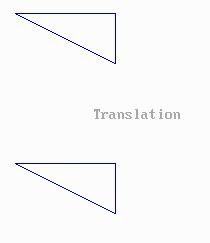
2D TRANSFORMATION  in c program  computer graphics lab

2D TRANSFORMATION
---------------------------------------------------
1.Translation 

2.Scaling
3.Shearing
4.Reflection
5.Rotation
Enter your Choice :2
 

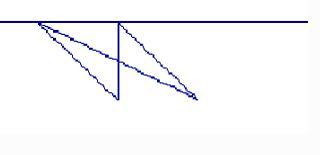
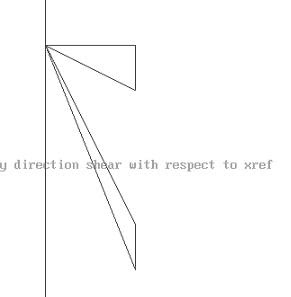
SEE THE FOLLOWING OUTPUT SCALING, SHEARING WITH 2 DIGARM(Shearing Y direction with respect to Xref &,Shearing x direction with respect to yref)
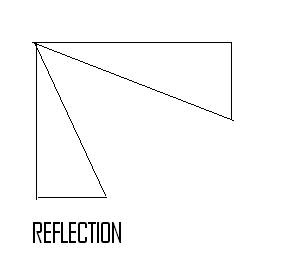
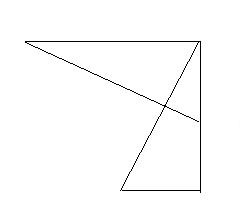
Source coding Output REFLECTION & ROTATION 2D TRANSFORMATION
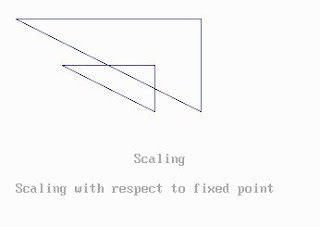
2D TRANSFORKMATION  in c program  computer graphics lab
2D TRANSFORKMATION  in c program  computer graphics lab2D TRANSFORKMATION  in c program  computer graphics lab2D TRANSFORKMATION  in c program  computer graphics lab2D TRANSFORKMATION  in c program  computer graphics lab

read more "2 Dimensional Translation in C program | CS1355-Graphics & Multimedia Lab"

3 Dimensional Translation in C program | CS1355-Graphics & Multimedia Lab

3 dimensional transformation it has three axis x,y,z.Depandting upon there coordinate it will perform there Translation ,Rotaion,Scaling, The translation can be performed by changing the sign of the translation components Tx, Ty, and Tz.

Source code programming
#include
#include
#include
#include
void draw3d(int fs,int x[20],int y[20],int tx,int ty,int d);
void draw3d(int fs,int x[20],int y[20],int tx,int ty,int d)
{
int i,j,k=0;
for(j=0;j<2;j++)
{
for(i=0;i {
if(i!=fs-1)
line(x[i]+tx+k,y[i]+ty-k,x[i+1]+tx+k,y[i+1]+ty-k);
else
line(x[i]+tx+k,y[i]+ty-k,x[0]+tx+k,y[0]+ty-k);
}
k=d;
}
for(i=0;i {
line(x[i]+tx,y[i]+ty,x[i]+tx+d,y[i]+ty-d);
}
}

void main()
{
int gd=DETECT,gm;
int x[20],y[20],tx=0,ty=0,i,fs,d;
initgraph(&gd,&gm,"");
printf("no of sides (front view only) : ");
scanf("%d",&fs);
printf("co-ordinates : ");
for(i=0;i {
printf("(x%d,y%d)",i,i);
scanf("%d%d",&x[i],&y[i]);
}
printf("Depth :");
scanf("%d",&d);
draw3d(fs,x,y,tx,ty,d);
printf("translation (x,y)");
scanf("%d%d",&tx,&ty);
draw3d(fs,x,y,tx,ty,d);
getch();
}


3D TRANSFORMATION in c program computer graphics lab
---------------------------------------------------
1.Translation
2.Rotation
3.Scaling
4.Exit
Enter your Choice :1
Enter the points 01: 288
Enter the points 10: 288
Enter the points 10: 258
Enter the points 11: 288
Enter the points 20: 258
Enter the points 21: 258
Enter the points 30: 288
read more "3 Dimensional Translation in C program | CS1355-Graphics & Multimedia Lab"

3Dimensional Projection Front Top Side view images in c Visualize

Aim
To Draw and visualize 3D projection Fron view top view and side view using c program 3 Dimensional Projection in C program CS1355-Graphics & Multimedia Lab projections of 3D images.
Algorithm
Start the program 3D projection Images
Using for loop get the no of corrdiante of the 3D view
Using line funtion in graphics we draw the projection
Front view is draw by the following code
if(i!=fs-1)
line(x[i]+some constang value,y[i],x[i+1]+some constant value,y[i+1]);
else
line(x[i]+some constant value,y[i],x[0]+some constant value,y[0]);
in For loop
like that the other top view and side view is drawn by the line function
Finally terminate the 3 Dimensional image view in Front view,Top view and side view

Source code in C program for three dimensional Projection visualize projections of 3D images
#include
#include
#include
#include
void draw3d(int fs,int x[20],int y[20],int tx,int ty,int d);
void draw3d(int fs,int x[20],int y[20],int tx,int ty,int d)
{
int i,j,k=0;
for(j=0;j<2;j++)
{
for(i=0;i {
if(i!=fs-1)
line(x[i]+tx+k,y[i]+ty-k,x[i+1]+tx+k,y[i+1]+ty-k);
else
line(x[i]+tx+k,y[i]+ty-k,x[0]+tx+k,y[0]+ty-k);
}
k=d;
}
for(i=0;i {
line(x[i]+tx,y[i]+ty,x[i]+tx+d,y[i]+ty-d);
}
}

void main()
{
int gd=DETECT,gm;
int x[20],y[20],tx=0,ty=0,i,fs,d;
initgraph(&gd,&gm,"");
printf("No of sides (front view only) : ");
scanf("%d",&fs);
printf("Co-ordinates : ");
for(i=0;i {
printf("(x%d,y%d)",i,i);
scanf("%d%d",&x[i],&y[i]);
}
printf("Depth :");
scanf("%d",&d);
draw3d(fs,x,y,tx,ty,d);
getch();//front view
setcolor(14);
for(i=0;i {
if(i!=fs-1)
line(x[i]+200,y[i],x[i+1]+200,y[i+1]);
else
line(x[i]+200,y[i],x[0]+200,y[0]);
}
getch();//top view
for(i=0;i {
line(x[i],300,x[i+1],300);
line(x[i],300+d*2,x[i+1],300+d*2);
line(x[i],300,x[i],300+d*2);
line(x[i+1],300,x[i+1],300+d*2);
}
getch();//side view
for(i=0;i {
line(10,y[i],10,y[i+1]);
line(10+d*2,y[i],10+d*2,y[i+1]);
line(10,y[i],10+d*2,y[i]);
line(10,y[i+1],10+d*2,y[i+1]);
}
getch();
closegraph();
}
Output three dimensional proection front view top view side view in c program
read more "3Dimensional Projection Front Top Side view images in c Visualize"

Two Dimensional Transformations Algorithm |Computer Graphics Translate In C++


In this 2D Transformation it will perform Translation, scaling, Rotation, shearing Reflection. In these source code it has separate function for there operation example translation it has the function name translation().

Source code for translation Algorithm C Programming
#include
#include
#include
#include
int x1,y1,x2,y2;
void translation()
{
int tx,ty,xn1,xn2,yn1,yn2;
printf("Enter the Translation Vector:");
scanf("%d\n%d",&tx,&ty);
cleardevice();
outtextxy(400,100,"TRANSLATION");
xn1=x1+tx;
yn1=y1+ty;
xn2=x2+tx;
yn2=y2+ty;
line(x1,y1,x2,y2);
line(xn1,yn1,xn2,yn2);
getch();
}
void scaling()
{
int xn1,yn1,xn2,yn2;
float sx,sy;
printf("Enter the Sacling Factor:");
scanf("%f\n%f",&sx,&sy);
cleardevice();
outtextxy(300,200,"SCALING");
xn1=x1*sx;
yn1=y1*sy;
xn2=x2*sx;
yn2=y2*sy;
line(x1,y1,x2,y2);
line(xn1,yn1,xn2,yn2);
getch();
}
void rotation()
{
int r;
float rx,xn1,yn1,xn2,yn2;
printf("Enter the Angle for Rotation:");
scanf("%d",&r);
cleardevice();
outtextxy(500,200,"ROTATION");
rx=(r*3.14)/180;
xn1=x1*cos(rx)-y1*sin(rx);
yn1=y1*cos(rx)+x1*sin(rx);
xn2=x2*cos(rx)-y2*sin(rx);
yn2=y2*cos(rx)+x2*sin(rx);
line(x1,y1,x2,y2);
line(xn1,yn1,xn2,yn2);
getch();
}
void shearing()
{
int sh;
float xn1,yn1,xn2,yn2;
printf("Enter the value of Shearing");
scanf("%d",&sh);
cleardevice();
outtextxy(500,100,"SHEARING");
xn1=x1+sh*y1;
yn1=y1;
xn2=x2+sh*y2;
yn2=y2;
line(x1,y1,x2,y2);
line(xn1,yn1,xn2,yn2);
getch();
}
void reflection()
{
int xn1,yn1,xn2,yn2;
cleardevice();
outtextxy(300,100,"REFLECTION");
if((x1Output Algorithm 2D Transformation CS1355-Graphics and Multimedia Lab

Translation, scaling, Rotation, shearing Reflection,
Two Dimensional Transformations Algorithm Two Dimensional Transformations Algorithm Translation, scaling, Rotation, shearing Reflection
read more "Two Dimensional Transformations Algorithm |Computer Graphics Translate In C++"

Visualization of 3-Dimensional Images Algorithm

These Program is draw the three dimensional image using bard3d graphics function. using maxx=getmaxx();
maxy=getmaxy(); it will get the center of the coordinate using these coordinate it will draw the three dimensional visualization image
Source code three Dimensional Image algorithm 
#include
#include
#include
#include
int maxx,maxy,midx,midy;
void axis()
{
getch();
cleardevice();
line(midx,0,midx,maxy);
line(0,midy,maxx,midy);
}
void main()
{
int gd,gm,x,y,z;
clrscr();
detectgraph(&gd,&gm);
initgraph(&gd,&gm,"c:/tc/bgi");
setfillstyle(0,getmaxcolor());
maxx=getmaxx();
maxy=getmaxy();
midx=maxx/2;
midy=maxy/2;
bar3d(midx-250,midy+150,midx-150,midy+225,20,4);
printf("\nEnter the Perspective Projection Vector");
scanf("%d%d%d",&x,&y,&z);
bar3d(midx-(x*5),midy-(y*9),midx-(x*3),midy-(y*5),10*z,4);
getch();
closegraph();
}

3-Dimensional Images Algorithm OUTPUT
Visualization of 3-Dimensional Images Algorithm
read more "Visualization of 3-Dimensional Images Algorithm"

Three Dimensional Transformation Algorithms in c Language Programming

These 3d dimesional Transformation algorithm was draw by the mathematical calculation using sin and cos function in Math.h header file using bar3d function in Graphics header file.And it will perform After the scaling Operation in x-axis y-axis z-axis.In these three dimensional it show the translation effect
You can see also there another type of program
Source code 3D transformation algorithm Source code in C Language programming 
#include
#include
#include
#include
int maxx,maxy,midx,midy;
void axis()
{
getch();
cleardevice();
line(midx,0,midx,maxy);
line(0,midy,maxx,midy);
}
void main()
{
int gd,gm,x,y,z,o,x1,x2,y1,y2;
detectgraph(&gd,&gm);
initgraph(&gd,&gm,"c:/tc/bgi");
setfillstyle(0,getmaxcolor());
maxx=getmaxx();
maxy=getmaxy();
midx=maxx/2;
midy=maxy/2;
axis();
bar3d(midx+50,midy-100,midx+60,midy-90,5,1);
printf("\nEnter the Translation Factor");
scanf("%d%d",&x,&y);
axis();
printf("\nAfter Translation");
bar3d(midx+50,midy-100,midx+60,midy-90,5,1);
bar3d(midx+x+50,midy-(y+100),midx+x+60,midy-(y+90),5,1);
axis();
bar3d(midx+50,midy-100,midx+60,midy-90,5,1);
printf("\nEnter the Scaling Factor");
scanf("%d%d%d",&x,&y,&z);
axis();
printf("\nAfter Scaling");
bar3d(midx+50,midy-100,midx+60,midy-90,5,1);
bar3d(midx+(x*50),midy-(y*100),midx+(x*60),midy-(y*90),5*z,1);
axis();
bar3d(midx+50,midy-100,midx+60,midy-90,5,1);
printf("\nEnter the Rotating Angle");
scanf("%d",&o);
x1=50*cos(o*3.14/180)-100*sin(o*3.14/180);
y1=50*sin(o*3.14/180)+100*cos(o*3.14/180);
x2=60*cos(o*3.14/180)-90*sin(o*3.14/180);
y2=60*sin(o*3.14/180)+90*cos(o*3.14/180);
axis();
printf("\nAfter Rotating about Z-axis");
bar3d(midx+50,midy-100,midx+60,midy-90,5,1);
bar3d(midx+x1,midy-y1,midx+x2,midy-y2,5,1);
axis();
printf("\nAfter rotating about X-axis");
bar3d(midx+50,midy-100,midx+60,midy-90,5,1);
bar3d(midx+50,midy-x1,midx+60,midy-x2,5,1);
axis();
printf("\nAfter rotating about Y-axis");
bar3d(midx+50,midy-100,midx+60,midy-90,5,1);
bar3d(midx+x1,midy-100,midx+x2,midy-90,5,1);
getch();
closegraph();
}
OUTPUT 3D transformation algorithm Computer Graphics CS1355-Graphics and Multimedia Lab
Output for translation scaling translation in X-axis Y-axis and z-axis

Visualization of 3-Dimensional Images Algorithm
Visualization of 3-Dimensional Images Algorithm After Translation
Visualization of 3-Dimensional Images Algorithm Scaling
Visualization of 3-Dimensional Images Algorithm
Visualization of 3-Dimensional Images Algorithm in Z Axiz
read more "Three Dimensional Transformation Algorithms in c Language Programming"

Implementation Of 2D Transformations Computer Graphics

To write a C program to implement 2D transformations.
Step By Step Procedural Algorithm 
1. Enter the choice for transformation.
2. Perform the translation, rotation, scaling, reflection and shearing of 2D object.
3. Get the needed parameters for the transformation from the user.
4. Incase of rotation, object can be rotated about x or y axis.
5. Display the transmitted object in the screen.
Source Code Programming 2D Transformations
#include
#include
#include
#include
int ch,x,y,az,i,w,ch1,ch2,xa,ya,ra,a[10],b[10],da,db;
float x1,y1,az1,w1,dx,dy,theta,x1s,y1s,sx,sy,a1[10],b1[10];
void main()
{
int gm ,gr;
clrscr();
detectgraph(&gm,&gr);
initgraph(&gm,&gr,"d:\\tc\\BGI");
printf("Enter the upper left corner of the rectangle:\n");
scanf("%d%d",&x,&y);
printf("Enter the lower right corner of the rectangle:\n");
scanf("%d%d",&az,&w);
rectangle(x,y,az,w);
da=az-x;
db=w-y;
a[0]=x;
b[0]=y;
a[1]=x+da;
b[1]=y;
a[2]=x+da;
b[2]=y+db;
a[3]=x;b[3]=y+db;
while(1)
{
printf("******2D Transformations*******\n");
printf("1.Translation\n2.Rotation\n3.Scaling\n4.Reflection\n5.Shearing\n6.Exit\nEnter your choice:\n");
scanf("%d",&ch);
switch(ch)
{
case 1:
detectgraph(&gm,&gr);
initgraph(&gm,&gr,"d:\\tc\\BGI");
rectangle(x,y,az,w);
printf("*******Translation*******\n\n");
printf("Enter the value of shift vector:\n");
scanf("%f%f",&dx,&dy);
x1=x+dx;
y1=y+dy;
az1=az+dx;
w1=w+dy;
rectangle(x1,y1,az1,w1);
break;
case 2:
detectgraph(&gm,&gr);
initgraph(&gm,&gr,"d:\\tc\\BGI");
rectangle(x,y,az,w);
printf("*******Rotation*******\n\n");
printf("Enter the value of fixed point and angle of rotation:Enter the value of fixed point and angle of rotation:\n");
scanf("%d%d%d",&xa,&ya,&ra);
theta=(float)(ra*(3.14/180));
for(i=0;i<4;i++)
{
a1[i]=(xa+((a[i]-xa)*cos(theta)-(b[i]-ya)*sin(theta)));
b1[i]=(ya+((a[i]-xa)*sin(theta)+(b[i]-ya)*cos(theta)));
}
for(i=0;i<4;i++)
{
if(i!=3)
line(a1[i],b1[i],a1[i+1],b1[i+1]);
else
line(a1[i],b1[i],a1[0],b1[0]);
}
break;
case 3:
detectgraph(&gm,&gr);
initgraph(&gm,&gr,"d:\\tc\\BGI");
rectangle(x,y,az,w);
printf("********Scaling*******\n\n");
printf("Enter the value of scaling factor:\n");
scanf("%f%f",&sx,&sy);
x1=x*sx;
y1=y*sy;
az1=az*sx;
w1=w*sy;
rectangle(x1,y1,az1,w1);
break;
case 4:
detectgraph(&gm,&gr);
initgraph(&gm,&gr,"d:\\tc\\BGI");
rectangle(x,y,az,w);
printf("*******Reflection*********\n");
printf("1.About x-axis\n2.About y-axis\n3.About both axis\nEnter your choice:\n");
scanf("%d",&ch1);
switch(ch1)
{
case 1:
printf("Enter the fixed point\n");
scanf("%d%d",&xa,&ya);
theta=(float)(90*(3.14/180));
for(i=0;i<4;i++)
{
a1[i]=(xa+((a[i]-xa)*cos(theta)-(-b[i]-ya)*sin(theta)));
b1[i]=(ya+((a[i]-xa)*sin(theta)+(-b[i]-ya)*cos(theta)));
}
for(i=0;i<4;i++)
{
if(i!=3)
line(a1[i],b1[i],a1[i+1],b1[i+1]);
else
line(a1[i],b1[i],a1[0],b1[0]);
}
break;
case 2:
printf("Enter the fixed point\n");
scanf("%d%d",&xa,&ya);
theta=(float)(270*(3.14/180));
for(i=0;i<4;i++)
{
a1[i]=(xa+((-a[i]-xa)*cos(theta)-(b[i]-ya)*sin(theta)));
b1[i]=(ya+((-a[i]-xa)*sin(theta)+(b[i]-ya)*cos(theta)));
}
for(i=0;i<4;i++)
{
if(i!=3)
line(a1[i],b1[i],a1[i+1],b1[i+1]);
else
line(a1[i],b1[i],a1[0],b1[0]);
}
break;
case 3:
printf("Enter the fixed point\n");
scanf("%d%d",&xa,&ya);
theta=(float)(180*(3.14/180));
for(i=0;i<4;i++)
{
a1[i]=(xa+((-a[i]-xa)*cos(theta)-(-b[i]-ya)*sin(theta)));
b1[i]=(ya+((-a[i]-xa)*sin(theta)+(-b[i]-ya)*cos(theta)));
}
for(i=0;i<4;i++)
{
if(i!=3)
line(a1[i],b1[i],a1[i+1],b1[i+1]);
else
line(a1[i],b1[i],a1[0],b1[0]);
}
break;
}
break;
case 5:
detectgraph(&gm,&gr);
initgraph(&gm,&gr,"d:\\tc\\BGI");
rectangle(x,y,az,w);
printf("*******Shearing******\n\n");
printf("1.x-direction shear\n2.y-direction shear\nEnter your choice:\n");
scanf("%d",&ch2);
switch(ch2)
{
case 1:
printf("Enter the value of shear:\n");
scanf("%f",&x1s);
x1=x+(y*x1s);
y1=y;
az1=az+(w*x1s);
w1=w;
rectangle(x1,y1,az1,w1);
break;
case 2:
printf("Enter the value of shear:\n");
scanf("%f",&y1s);
x1=x;
y1=y+(x*y1s);
az1=az;
w1=w+(az*y1s);
rectangle(x1,y1,az1,w1);
break;
}
break;
case 6:
exit(0);
}
}
getch();
}
Example OUTPUT Result compuer Graphics

Enter the upper left corner of the rectangle:
100
100
Enter the lower right corner of the rectangle:
200
200
******2DTransformations*******
1.Translation
2.Rotation
3.Scaling
4.Reflection
5.Shearing
6.Exit

Enter your choice: 1

*******Translation******* Enter the value of shift vector:
150
150
******2DTransformations*******
1.Translation
2.Rotation
3.Scaling
4.Reflection
5.Shearing
6.Exit
Enter your choice: 2
*******Rotation*******
Enter the value of fixed point and angle of rotation:
300
300
70
******2DTransformations******* 1.Translation
2.Rotation
3.Scaling
4.Reflection
5.Shearing
6.Exit
Enter your choice: 3
********Scaling*******
Enter the value of scaling factor:
2
2
******2DTransformations*******
1.Translation
2.Rotation
3.Scaling
4.Reflection
5.Shearing
6.Exit

Enter your choice: 4
*******Reflection*********
1.About x-axis
2.About y-axis
3.About both axis
Enter your choice:1
Enter the fixed point
150
150
Enter your choice: 2
Enter the fixed point
150
150
Enter your choice: 3
Enter the fixed point
150
150
******2DTransformations******* 1.Translation
2.Rotation
3.Scaling
4.Reflection
5.Shearing
6.Exit
Enter your choice: 5
*******Shearing*********
1.x-direction shear
2.y-direction shear
Enter your choice: 1
Enter the value of shear : 2
Enter your choice: 2
Enter the value of shear : 2
RESULT: Thus the c program to implement 2D transformations was coded and executed successfully.
read more "Implementation Of 2D Transformations Computer Graphics"

Implementation of 3D Transformation in Computer Graphics

To write a C program to implement 3D transformations. 3 Dimensional Transformation
ALGORITHM 3 Dimensional Transformation Source Code
1. Enter the choice for transformation.
2. Perform the translation, rotation, scaling of 3D object.
3. Get the needed parameters for the transformation from the user. 
4. Increase of rotation, object can be rotated about x or y or z axis.
5. Display the transmitted object in the screen
Source Code Programming Algorithm
#include
#include
#include
#include
int maxx,maxy,midx,midy;
void axis()
{
getch();
cleardevice();
line(midx,0,midx,maxy);
line(0,midy,maxx,midy);
}
void main()
{
int gd,gm,x,y,z,o,x1,x2,y1,y2;
detectgraph(&gd,&gm);
initgraph(&gd,&gm,"d:\\tc\\bgi");
setfillstyle(0,getmaxcolor());
maxx=getmaxx();
maxy=getmaxy();
midx=maxx/2;
midy=maxy/2;
axis();
bar3d(midx+100,midy-150,midx+60,midy-100,10,1);
printf("\Enter the translation factor");
scanf("%d%d",&x,&y);
axis();
printf("After translation");
bar3d(midx+100,midy-150,midx+60,midy-100,10,1);
bar3d(midx+x+100,midy-(y+150),midx+x+60,midy-(y+100),10,1);
axis();
bar3d(midx+100,midy-150,midx+60,midy-100,10,1);
printf("Enter the scaling factor");
scanf("%d%d%d",&x,&y,&z);
axis();
printf("After scaling");
bar3d(midx+100,midy-150,midx+60,midy-100,10,1);
bar3d(midx+(x*100),midy-(y*150),midx+(x*60),midy-(y*100),10*z,1);
axis();
bar3d(midx+100,midy-150,midx+60,midy-100,10,1);
printf("Enter the rotation angle");
scanf("%d",&o);
x1=50*cos(o*3.14/180)-100*sin(o*3.14/180);
y1=50*sin(o*3.14/180)+100*cos(o*3.14/180);
x2=60*cos(o*3.14/180)-90*sin(o*3.14/180);
y2=60*sin(o*3.14/180)+90*cos(o*3.14/180);
axis();
printf("After rotating about Z-axis");
bar3d(midx+100,midy-150,midx+60,midy-100,10,1);
bar3d(midx+x1,midy-y1,midx+x2,midy-y2,10,1);
axis();
printf("After rotating about x-axis");
bar3d(midx+100,midy-150,midx+60,midy-100,10,1);
bar3d(midx+100,midy-x1,midx+60,midy-x2,10,1);
axis();
printf("After rotating about Y-axis");
bar3d(midx+100,midy-150,midx+60,midy-100,10,1);
bar3d(midx+x1,midy-150,midx+x2,midy-100,10,1);
getch();
closegraph();
}
OUTPUT
Translation Output Example
RESULT Thus the c program to implement 3D transformations was coded and executed successfully.
read more "Implementation of 3D Transformation in Computer Graphics"

Flag counter

free counters