Php is the server side programming. And some reason onclick event does not use or work in php. But you can Use the other method which performs action when onclick event occur. This onclick event alternate method is form. By through form you can transfer the value from one page to another page when onclick event occur. But in these case you must specify value in the input section and you can give input type as hidden. Form it has two methods get and post method. And when user click the submit button the value is passes and action will be performed. If you have anything different alternate method to use onclick in php give your comments.
Onclick event in PHP| How to use onclick event in php? Onclick event alternate method in php
Outlook Express Configuration Error message Error Number: 0x800CCC79
Here I send mail to 'spammailservice@gmail.com'.
Subject as mail guarded
After I configure Outlook express I send mail to spammailservice@gmail.com.
While I sending message it through the error message .
"The message could not be sent because one of the recipients was rejected by the server. The rejected e-mail address was 'spammailservervice@gmail.com'. Subject 'mail guarded', Account: 'mail.antivirusprotection.com', Server: 'mail.antivirusprotection.com', Protocol: SMTP, Server Response: '530 Relaying not allowed (enable smtp authentication on your email client)', Port: 25, Secure(SSL): No, Server Error: 530, Error Number: 0x800CCC79"
What is solution for that problem?
Go to Tools >>account>>prosperities>>
Click server tab>> enable >>My server require authentication
Finally click ok.
Then try it.
Error Number: 0x800CCC79
(enable smtp authentication on your email client)', Port: 25, Secure(SSL): No, Server Error: 530, Error Number: 0x800CCC79
Source Code Program To Demonstrate Four signal Interrupt Linux Shell Programming
To create any four signal and interrupt.
By through simple action it will create Signal. For signal implementation we insert signal.h header file. it has 3 function window_changed(), quit(),kills(),catch_child(init sig_num).
Linux shell Programming Source code in C | signal interrupt
#include<stdio.h>
#include<signal.h>
void window_changed()
{
printf("\n\tWindow size is changed\n\n");
}
void quit()
{
printf("\n\tCtrll backslash pressed\n");
}
void kills()
{
printf("\n\tcontrol Z is pressed to stop the process\n");
exit(0);
}
void catch_child(int sig_num)
{
printf("\n\tchild exited\n");
}
void arm()
{
int pid,i;
int status;
signal(SIGCHLD,catch_child);
printf("\n\talarm is ringing\n");
pid=fork();
switch(pid)
{
case 0: printf("\nchild is created\n");
for(i=0;i<4;i++)
{
printf("\nchild count %d",i);
sleep(1);
}
exit(1);
break;
default: wait(&status);
kill(pid,SIGKILL);
}
}
int main()
{
int pid;
printf("\n\tEnter a key");
signal(SIGWINCH,window_changed);
signal(SIGQUIT,quit);
signal(SIGALRM,arm);
signal(SIGTSTP,kills);
alarm(5);
for(;;)
{
}
return 0;
}
FOUR SIGNAL AND INTERRUPT OUTPUT:
Enter a key
alarm is ringing
child is created
child count 0
child count 1
child count 2
child count 3
child exited
^\
Ctrll backslash pressed
Window size is changed
^Z
control Z is pressed to stop the process
CONCLUSION: The following c program demonstrate signals and interrupt.
What are current scheduling task |How to remove the scheduling task in Linux?
Looking at schedule task by through atq command atq command it will display what are job are there in at queue . atrm it will remove task from at queue
Detail about at command "How to Run the Command at Specified Time Using at Command in Linux"
[root@studentwebsite fol]# atq
9 2009-06-14 18:52 a root
Now the only one job
Then create the another one
[root@studentwebsite fol]# at now +1 minutes
at> mkdir fol5
at>
[4]+ Stopped at now +1 minutes
Then list out now the job are two.
[root@studentwebsite fol]# atq
10 2009-06-14 18:52 a root
9 2009-06-14 18:52 a root
Deletion of Scheduled task
atrm used to remove the task form the at queue atrm command remove by the atq job no[root@studentwebsite fol]# atq
10 2009-06-14 18:52 a root
9 2009-06-14 18:52 a root
remove the scheduling from the at command
atrm->at remove
[root@studentwebsite fol]# atrm 10
[root@studentwebsite fol]# atq
Now it has the only one job.
9 2009-06-14 18:52 a root
How to Run the Command at Specified Time Using at Command in Linux
at command is used to run process(like command mkdir,ls,..,) at a particular time. This command is used to perform the task at non-working hours. Command at is normally used to get backup from the file system.
See post: Access control files at.allow and at.deny Task Automation at who can Schedule Task in Linux
There are several method to denote the time
at 10:00 PM
at 10:00 PM july
at midnight
at now +10 minutes
at 8:30am 25/12/20010
Example
[root@studentwebsite fol]# at now +1 minutes
at> mkdir studentwebsite
at> <EOT>
[root@studentwebsite fol]# ls -l
total 0
After one minutes
[root@studentwebsite fol]# ls -l
total 8
drwxr-xr-x 2 root root 4096 Jun 14 18:49 studentwebsite
Find Sum of N Numbers Using RMI | RMI Airthematic Operation
Algorithm and step by step procedure RMI
Serialization and Data marshaling
To transfer objects, the RMI API uses the Serialization API to wrap (marshal) and unwrap (unmarshal) the objects. To marshal an object, the Serialization API converts the object to a stream of bytes, and to unmarshal an object, the Serialization API converts a stream of bytes into an object..
Steps:
• Define the remote interface
• Implement the server
• Implement the client
• Compile the source files
• Start the Java RMI registry, server, and client
The files needed for this program are:
• MyInterface.java - a remote interface
• MyServer.java - a remote object implementation that implements the remote interface
• MyClient.java - a simple client that invokes a method of the remote interface
1. Define the remote interface
A remote object is an instance of a class that implements a remote interface. A remote interface extends the interface java.rmi.Remote and declares a set of remote methods. Each remote method must declare java.rmi.RemoteException (or a superclass of RemoteException) in its throws clause, in addition to any application-specific exceptions.
2. Implement the server
• Create a remote object
• Register the remote object with a Java RMI registry
The implementation class MyServer implements the remote interface MyInterface, providing an implementation for the remote method.
3. Implement the client
The client program obtains a stub for the registry on the server's host, looks up the remote object's stub by name in the registry.
Next, the client invokes the remote method lookup on the registry stub to obtain the stub for the remote object from the server's registry.
Finally, the client invokes the method on the remote object's stub, which causes the following actions to happen:
• The client-side runtime opens a connection to the server using the host and port information in the remote object's stub and then serializes the call data.
• The server-side runtime accepts the incoming call, dispatches the call to the remote object, and serializes the result to the client.
• The client-side runtime receives, deserializes, and returns the result to the caller.
4. Compile the source files
The source files for this example can be compiled as follows:
javac MyInterface.java
javac MyServer.java
javac MyClient.java
5. Generate Stubs and Skeletons
6. Start the Java RMI registry, server, and client
To run this example, you will need to do the following:
• Start the Java RMI registry
• Start the server
• Run the client
Start the Java RMI registry
Before start the RMI Registry we should be set path of the registry, type the following command
Set path=c:\jdk1.5\bin
start rmiregistry
Source code Programming Remote method invocation
a) Server Program
import java.rmi.*;
import java.rmi.registry.*;
import java.rmi.server.*;
public class MyServer extends UnicastRemoteObject implements MyInterface
{
public MyServer() throws RemoteException
{}
public int SumOfSeries(int n) throws RemoteException
{
int res;
res=(n*(n+1))/2;
return res;
}
public static void main(String args[]) throws Exception
{
MyServer ms=new MyServer();
Naming.bind("rmi:///Peace",ms);
System.out.println("Server Ready!!!");
}
}
b) Client Program
import java.rmi.*;
import java.io.*;
public class MyClient
{
public static void main(String args[])throws Exception
{
try
{
MyInterface obj=(MyInterface)Naming.lookup("rmi:///Peace");
int res,a,b,c;
DataInputStream din=new DataInputStream(System.in);
System.out.println("Enter the number n to find the Sum:");
a=Integer.parseInt(din.readLine());
System.out.println("The Sum of"+a+" is"+obj.SumOfSeries(a));
}
catch(Exception e)
{
System.out.println("Error in input!!!");
}
}
}
c) Interface Program
import java.rmi.*;
interface MyInterface extends Remote
{
public int SumOfSeries(int n)throws RemoteException;
}
Time And Work Ratio Quantitative Aptitude Question and Answer From R.S Aggarwal Book
Aptitude Question: Answer:
First: A is twice as good workman as B:
A=2B----1
Second data: together they finish work in 18 days
A+B=18 days-----2
Third question: How many days A alone finish the work?
A, B they together work there one day work is =1/18
A+B=1/18
Submit equation 1 into 2
3B=1/18
B=1/(18*3)
B=1/54
A=1/18-1/54
A=(3-1)/54=2/54=1/27
Finally A alone he finish the work in 27 days. Source from R.S Aggarwal Book
Linux Mount Command Read -r Write -w Print version -V List -l Help -h Verbose -v Mount File system -a Rhel5
In the Linux before you need to use any device or resource you need to mount that device or file system then only you can use the specified resource.
For these purpose Linux Mount command has been used.
Mount command Different option
-r read only mounted file system
-w write write only mounted file system
-a it will mount the file system as per /etc/fstab (files sytem) /etc/mtab (mount) file
it will ignore file system which contain key word noauto
support-rhel5 ~ # mount -a (refresh the mount file system)
if you change anything in fstab then if you need to refresh the mount file system
you can use the mount -a command it mounted file system as per /etc/fstab file
mount -a
V Refer to the version
support-rhel5 ~ # mount -V
mount from util-linux-ng 2.14.2 (with libvolume_id and selinux support
-h help for mount command and different option
support-rhel5 ~ # mount -h
Usage: mount -V : print version
mount -h : print this help
mount : list mounted filesystems
mount -l : idem, including volume labels
mount --make-shared dir
mount --make-slave dir
mount --make-private dir
mount --make-unbindable dir
mount --make-rshared dir
mount --make-rslave dir
mount --make-rprivate dir
mount --make-runbindable dir
mount -a [-t|-O] ... : mount all stuff from /etc/fstab
mount device : mount device at the known place
mount directory : mount known device here
mount -t type dev dir : ordinary mount command
support-rhel5 ~ #mount -o
In the mount command if you use more that two string then you can need to use comma ','
for these purpose you can use -o option
It is used for the ACL access control list
Refer the Link Linux ACL configuration tutorial
support-rhel5 ~ # mount -o acl,remount /
-l List the all the mounted file system.
support-rhel5 ~ # mount -l
It will list out all the mounted File system and device
How To Find Linux System Bit Version 32 Bit or 64 Bit Version
There are There Method to Identify the Linux Operating System Bit version.
Is it 32 bit or 64 bit.
First Method
File command is used to identify the file type.
what type of file.
Is it Directory, or ASCII file or Image.
Here In the
/usr/bin directory
it contain list of the binary file
it contain the file name like "file"
if you run command like
rhel5-bash ~ # file /usr/bin/file
/usr/bin/file: ELF 32-bit LSB executable, Intel 80386,version 1 (SYSV),
dynamically linked (uses shared libs), for GNU/Linux 2.6.15, stripped
You can identify the Linux operating system bit version.
similarly you can run the following command
rhel5-bash ~ # file /sbin/init
/sbin/init: ELF 32-bit LSB shared object, Intel 80386, version 1 (SYSV), dynamically linked (uses shared libs), for GNU/Linux 2.6.8, stripped
Second Method
uname command is used to identify the system information
rhel5-bash ~ # uname -m
i686
Refer the Link >> what is uname command How to identity the system information.
Third Method
Command getconf
These command is used to identify to get the system configuration variables
rhel5-bash #getconf -a
command it will list of list of configuration variable
Here we can filter CPU bit version through following grep
rhel5-bash ~ # getconf -a | grep LONG_BIT
LONG_BIT 32
List of getconfg variable
rhel5-bash man # getconf -a.........................................
............................................
647
INT_MIN -2147483648
IOV_MAX 1024
LOGNAME_MAX 256
LONG_BIT 32
MB_LEN_MAX 16
NGROUPS_MAX 65536
NL_ARGMAX 4096
NL_LANGMAX 2048
NL_MSGMAX 2147483647
NL_NMAX 2147483647
NL_SETMAX 2147483647
NL_TEXTMAX 2147483647
NSS_BUFLEN_GROUP 1024
NSS_BUFLEN_PASSWD 1024
NZERO 20
OPEN_MAX 1024
PAGESIZE 4096
PAGE_SIZE 4096
PASS_MAX 8192
PTHREAD_DESTRUCTOR_ITERATIONS 4
PTHREAD_KEYS_MAX 1024
PTHREAD_STACK_MIN 16384
PTHREAD_THREADS_MAX
SCHAR_MAX 127
SCHAR_MIN -128
SHRT_MAX 32767
SHRT_MIN -32768
SSIZE_MAX 32767
TTY_NAME_MAX 32
TZNAME_MAX 6
UCHAR_MAX 255
UINT_MAX 4294967295
UIO_MAXIOV 1024
ULONG_MAX 4294967295
USHRT_MAX 65535
WORD_BIT 32
_AVPHYS_PAGES 7910
_NPROCESSORS_CONF 1
_NPROCESSORS_ONLN 1
_PHYS_PAGES 256644
_POSIX_ARG_MAX 2097152
_POSIX_ASYNCHRONOUS_IO 200112
_POSIX_CHILD_MAX
_POSIX_FSYNC 200112
_POSIX_JOB_CONTROL 1
_POSIX_MAPPED_FILES 200112
_POSIX_MEMLOCK 200112
_POSIX_MEMLOCK_RANGE 200112
_POSIX_MEMORY_PROTECTION 200112
_POSIX_MESSAGE_PASSING 200112
_POSIX_NGROUPS_MAX 65536
_POSIX_OPEN_MAX 1024
_POSIX_PII
_POSIX_PII_INTERNET
_POSIX_PII_INTERNET_DGRAM
_POSIX_PII_INTERNET_STREAM
_POSIX_PII_OSI
_POSIX_PII_OSI_CLTS
_POSIX_PII_OSI_COTS
_POSIX_PII_OSI_M
_POSIX_PII_SOCKET
_POSIX_PII_XTI
_POSIX_POLL
_POSIX_PRIORITIZED_IO 200112
_POSIX_PRIORITY_SCHEDULING 200112
_POSIX_REALTIME_SIGNALS 200112
_POSIX_SAVED_IDS 1
_POSIX_SELECT
_POSIX_SEMAPHORES 200112
_POSIX_SHARED_MEMORY_OBJECTS 200112
_POSIX_SSIZE_MAX 32767
_POSIX_STREAM_MAX 16
_POSIX_SYNCHRONIZED_IO 200112
_POSIX_THREADS 200112
_POSIX_THREAD_ATTR_STACKADDR 200112
_POSIX_THREAD_ATTR_STACKSIZE 200112
_POSIX_THREAD_PRIORITY_SCHEDULING 200112
_POSIX_THREAD_PRIO_INHERIT 200112
_POSIX_THREAD_PRIO_PROTECT 200112
_POSIX_THREAD_PROCESS_SHARED 200112
_POSIX_THREAD_SAFE_FUNCTIONS 200112
_POSIX_TIMERS 200112
TIMER_MAX
_POSIX_TZNAME_MAX 6
_POSIX_VERSION 200112
_T_IOV_MAX
_XOPEN_CRYPT 1
_XOPEN_ENH_I18N 1
_XOPEN_LEGACY 1
_XOPEN_REALTIME 1
_XOPEN_REALTIME_THREADS 1
_XOPEN_SHM 1
_XOPEN_UNIX 1
_XOPEN_VERSION 600
_XOPEN_XCU_VERSION 4
_XOPEN_XPG2 1
_XOPEN_XPG3 1
_XOPEN_XPG4 1
BC_BASE_MAX 99
BC_DIM_MAX 2048
BC_SCALE_MAX 99
BC_STRING_MAX 1000
CHARCLASS_NAME_MAX 2048
COLL_WEIGHTS_MAX 255
EQUIV_CLASS_MAX
EXPR_NEST_MAX 32
LINE_MAX 2048
POSIX2_BC_BASE_MAX 99
POSIX2_BC_DIM_MAX 2048
POSIX2_BC_SCALE_MAX 99
POSIX2_BC_STRING_MAX 1000
POSIX2_CHAR_TERM 200112
POSIX2_COLL_WEIGHTS_MAX 255
POSIX2_C_BIND 200112
POSIX2_C_DEV 200112
POSIX2_C_VERSION
POSIX2_EXPR_NEST_MAX 32
POSIX2_FORT_DEV
POSIX2_FORT_RUN
_POSIX2_LINE_MAX 2048
POSIX2_LOCALEDEF 200112
POSIX2_RE_DUP_MAX 32767
POSIX2_SW_DEV 200112
POSIX2_UPE
POSIX2_VERSION 200112
RE_DUP_MAX 32767
PATH /bin:/usr/bin
CS_PATH /bin:/usr/bin
LFS_CFLAGS -D_LARGEFILE_SOURCE -D_FILE_OFFSET_BITS=64
LFS_LDFLAGS
LFS_LIBS
LFS_LINTFLAGS -D_LARGEFILE_SOURCE -D_FILE_OFFSET_BITS=64
LFS64_CFLAGS -D_LARGEFILE64_SOURCE
LFS64_LDFLAGS
LFS64_LIBS
LFS64_LINTFLAGS -D_LARGEFILE64_SOURCE
_XBS5_ILP32_OFF32 1
XBS5_ILP32_OFF32_CFLAGS -m32
XBS5_ILP32_OFF32_LDFLAGS -m32
XBS5_ILP32_OFF32_LIBS
XBS5_ILP32_OFF32_LINTFLAGS
_XBS5_ILP32_OFFBIG 1
XBS5_ILP32_OFFBIG_CFLAGS -m32 -D_LARGEFILE_SOURCE -D_FILE_OFFSET_BITS=64
XBS5_ILP32_OFFBIG_LDFLAGS -m32
XBS5_ILP32_OFFBIG_LIBS
XBS5_ILP32_OFFBIG_LINTFLAGS
_XBS5_LP64_OFF64
XBS5_LP64_OFF64_CFLAGS
XBS5_LP64_OFF64_LDFLAGS
XBS5_LP64_OFF64_LIBS
XBS5_LP64_OFF64_LINTFLAGS
_XBS5_LPBIG_OFFBIG
XBS5_LPBIG_OFFBIG_CFLAGS
XBS5_LPBIG_OFFBIG_LDFLAGS
XBS5_LPBIG_OFFBIG_LIBS
XBS5_LPBIG_OFFBIG_LINTFLAGS
_POSIX_V6_ILP32_OFF32 1
POSIX_V6_ILP32_OFF32_CFLAGS -m32
POSIX_V6_ILP32_OFF32_LDFLAGS -m32
POSIX_V6_ILP32_OFF32_LIBS
POSIX_V6_ILP32_OFF32_LINTFLAGS
_POSIX_V6_WIDTH_RESTRICTED_ENVS POSIX_V6_ILP32_OFF32
POSIX_V6_ILP32_OFFBIG
POSIX_V6_WIDTH_RESTRICTED_ENVS POSIX_V6_ILP32_OFF32
POSIX_V6_ILP32_OFFBIG
_POSIX_V6_ILP32_OFFBIG 1
POSIX_V6_ILP32_OFFBIG_CFLAGS -m32 -D_LARGEFILE_SOURCE -D_FILE_OFFSET_BITS=64
POSIX_V6_ILP32_OFFBIG_LDFLAGS -m32
POSIX_V6_ILP32_OFFBIG_LIBS
POSIX_V6_ILP32_OFFBIG_LINTFLAGS
_POSIX_V6_LP64_OFF64
POSIX_V6_LP64_OFF64_CFLAGS
POSIX_V6_LP64_OFF64_LDFLAGS
POSIX_V6_LP64_OFF64_LIBS
POSIX_V6_LP64_OFF64_LINTFLAGS
_POSIX_V6_LPBIG_OFFBIG
POSIX_V6_LPBIG_OFFBIG_CFLAGS
POSIX_V6_LPBIG_OFFBIG_LDFLAGS
POSIX_V6_LPBIG_OFFBIG_LIBS
POSIX_V6_LPBIG_OFFBIG_LINTFLAGS
_POSIX_ADVISORY_INFO 200112
_POSIX_BARRIERS 200112
_POSIX_BASE
_POSIX_C_LANG_rhel5
_POSIX_C_LANG_rhel5_R
_POSIX_CLOCK_SELECTION 200112
_POSIX_CPUTIME 200112
_POSIX_THREAD_CPUTIME 200112
_POSIX_DEVICE_SPECIFIC
_POSIX_DEVICE_SPECIFIC_R
_POSIX_FD_MGMT
_POSIX_FIFO
_POSIX_PIPE
_POSIX_FILE_ATTRIBUTES
_POSIX_FILE_LOCKING
_POSIX_FILE_SYSTEM
_POSIX_MONOTONIC_CLOCK 200112
_POSIX_MULTI_PROCESS
_POSIX_SINGLE_PROCESS
_POSIX_NETWORKING
_POSIX_READER_WRITER_LOCKS 200112
_POSIX_SPIN_LOCKS 200112
_POSIX_REGEXP 1
_REGEX_VERSION
_POSIX_SHELL 1
_POSIX_SIGNALS
_POSIX_SPAWN 200112
_POSIX_SPORADIC_SERVER
_POSIX_THREAD_SPORADIC_SERVER
_POSIX_SYSTEM_DATABASE
_POSIX_SYSTEM_DATABASE_R
_POSIX_TIMEOUTS 200112
_POSIX_TYPED_MEMORY_OBJECTS
_POSIX_USER_GROUPS
_POSIX_USER_GROUPS_R
POSIX2_PBS
POSIX2_PBS_ACCOUNTING
POSIX2_PBS_LOCATE
POSIX2_PBS_TRACK
POSIX2_PBS_MESSAGE
SYMLOOP_MAX
STREAM_MAX 16
AIO_LISTIO_MAX
AIO_MAX
AIO_PRIO_DELTA_MAX 20
DELAYTIMER_MAX 2147483647
HOST_NAME_MAX 64
LOGIN_NAME_MAX 256
MQ_OPEN_MAX
MQ_PRIO_MAX 32768
_POSIX_DEVICE_IO
_POSIX_TRACE
_POSIX_TRACE_EVENT_FILTER
_POSIX_TRACE_INHERIT
_POSIX_TRACE_LOG
RTSIG_MAX 32
SEM_NSEMS_MAX
SEM_VALUE_MAX 2147483647
SIGQUEUE_MAX
FILESIZEBITS 64
POSIX_ALLOC_SIZE_MIN 4096
POSIX_REC_INCR_XFER_SIZE
POSIX_REC_MAX_XFER_SIZE
POSIX_REC_MIN_XFER_SIZE 4096
POSIX_REC_XFER_ALIGN 4096
SYMLINK_MAX
GNU_LIBC_VERSION glibc 2.9
GNU_LIBPTHREAD_VERSION NPTL 2.9
POSIX2_SYMLINKS 1
LEVEL1_ICACHE_SIZE 0
LEVEL1_ICACHE_ASSOC 0
LEVEL1_ICACHE_LINESIZE 0
LEVEL1_DCACHE_SIZE 16384
LEVEL1_DCACHE_ASSOC 8
LEVEL1_DCACHE_LINESIZE 64
LEVEL2_CACHE_SIZE 262144
LEVEL2_CACHE_ASSOC 4
LEVEL2_CACHE_LINESIZE 64
LEVEL3_CACHE_SIZE
LEVEL3_CACHE_ASSOC
LEVEL3_CACHE_LINESIZE
LEVEL4_CACHE_SIZE 0
LEVEL4_CACHE_ASSOC 0
LEVEL4_CACHE_LINESIZE 0
IPV6 200112
RAW_SOCKETS 200112
How to identify Linux operating system Bit version | Configuration Information Uname File /use/bin /sbin/init command
Linux usermod command -e Expiry Date -l Login Name -c Command -s shell User Account -G Group
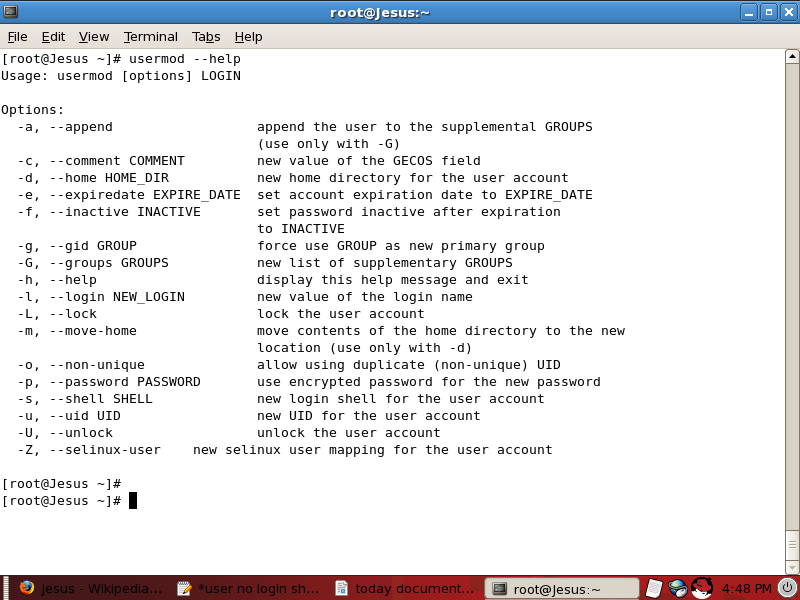
Linux usermod command is used to edit the user account . We can set user account expiry date ,change user login name, set the command for particular user, Add the user to the group
[root@program ~]# groupadd redhat
[root@program ~]# useradd rhel5
[root@program ~]# useradd rhel7
Add the user to the group -G option
Using -G option we can add the user rhel5 to the group Redhat
[root@program ~]# usermod -G redhat rhel5
[root@program ~]# usermod -G redhat rhel7
Edit the shell login -s option
Remove the shell login access for the user rhel7
[root@program ~]# usermod -s /sbin/nologin rhel7
[root@program ~]# su rhel7
This account is currently not available.
Set Expiry date -e option
[root@program ~]# su rhel5
Account has been login without any issue
set the expiry date for the user rhel5
[root@program ~]# usermod -e 2010-04-18 rhel5
After the date
$ su rhel5
Password:
Your account has expired; please contact your system administrator
Edit the comment or label for the user rhel5
[root@program ~]# usermod -c version5 rhel5
[root@program ~]# cat /etc/passwd | grep rhel5
rhel5:x:502:504:version5:/home/rhel5:/bin/bash
Change user login name -l option
[root@program ~]# usermod -l rhel55 rhel5
[root@program ~]# su rhel5
su: user rhel5 does not exist
[root@program ~]# su rhel55
Options:
-a, --append append the user to the supplemental GROUPS
(use only with -G)
-c, --comment COMMENT new value of the GECOS field
-d, --home HOME_DIR new home directory for the user account
-e, --expiredate EXPIRE_DATE set account expiration date to EXPIRE_DATE
-f, --inactive INACTIVE set password inactive after expiration
to INACTIVE
-g, --gid GROUP force use GROUP as new primary group
-G, --groups GROUPS new list of supplementary GROUPS
-h, --help display this help message and exit
-l, --login NEW_LOGIN new value of the login name
-L, --lock lock the user account
-m, --move-home move contents of the home directory to the new
location (use only with -d)
-o, --non-unique allow using duplicate (non-unique) UID
-p, --password PASSWORD use encrypted password for the new password
-s, --shell SHELL new login shell for the user account
-u, --uid UID new UID for the user account
-U, --unlock unlock the user account
-Z, --selinux-user new selinux user mapping for the user account
How to edit modify delete the user account
LVM Extend or Reduce Using e2fsck resize2fs lvextend lvreduce Command
After LVM creation if we need to extended or reduce we can do that using e2fsck, lvreduce,lvextend.
First we need to create Logical Volume Manager LVM CREATION TUTORIAL.
Now the Logical Volume size is 20MB
[rhel5@bash /]# lvdisplay
--- Logical volume ---
LV Size 20.00 MB
Now I will reduce the size 20MB into 12MB
Umount the file system for which one we want to reduce
[rhel5@bash /]# umount /dev/vg1/data
then using mount command check if the partition is mounted or not.
[rhel5@bash /]#mount
if it is umount successfully (not mount) then go to next step.
Check The File System
e2fsck comman is used to check the ext2 and ext3 file system.
This command is normally used when we reduce or extended file system. it will check the inodes, directory structure,
directory connectivity, and Rerference counts.
-f it will check the filesyste with force.
[rhel5@bash /]# e2fsck -f /dev/vg1/data
e2fsck 1.39 (29-May-2006)
Pass 1: Checking inodes, blocks, and sizes
Pass 2: Checking directory structure
Pass 3: Checking directory connectivity
Pass 4: Checking reference counts
Pass 5: Checking group summary information
/dev/vg1/data: 11/3072 files (9.1% non-contiguous), 1531/12288 blocks
[rhel5@bash /]# resize2fs /dev/vg1/data 12M
it will enlarge or shrink the partition size
[rhel5@bash /]# lvreduce -L 12M /dev/vg1/data
WARNING: Reducing active logical volume to 12.00 MB
THIS MAY DESTROY YOUR DATA (filesystem etc.)
Do you really want to reduce data? [y/n]: y
Reducing logical volume data to 12.00 MB
Logical volume data successfully resized
Now LVM Reduce succefully.
[rhel5@bash /]# lvdisplay --- Logical volume --- LV Name /dev/vg1/data VG Name vg1 LV UUID 0Qm2tL-PH7W-uve4-oRgu-lf3X-D4jF-4qKK8F LV Write Access read/write LV Status available # open 0 LV Size 12.00 MB Current LE 3 Segments 1 Allocation inherit Read ahead sectors auto - currently set to 256 Block device 253:0
Logical Volume Manager Extended Lvextend
it is just like lvreduce.
We need to follow the same step.
[rhel5@bash /]# resize2fs /dev/vg1/data 20M
[rhel5@bash /]# lvextend -L 20M /dev/vg1/data
Extending logical volume data to 20.00 MB
Logical volume data successfully resized
[rhel5@bash /]# lvdisplay
ignore this error message
resize2fs is used to re size the file system. resize2fs
Error message " [root@localhost ~]# vgcreate vg /dev/hd10 /dev/hda11 /dev/hda12
/dev/hd10 not identified as an existing physical volume
Unable to add physical volume '/dev/hd10' to volume group 'vg'."
How to Use dd Command to Take Backup | dd Command Tricks and Tips
dd command is used to convert or copy a file. it has the following important parameter
if=input file
of=output file
bs=bytes
1024 bytes as 1 KB
512 bytes*2=1024 kilo bytes
So now I create file with 2 block for 512 bytes
[san@backup home]# dd if=/dev/sda of=/home/t.image bs=512 count=2
2+0 records in
2+0 records out
1024 bytes (1.0 kB) copied, 7.8353e-05 seconds, 13.1 MB/s
[san@backup home]# ls -lh t.image
-rw-r--r-- 1 san san 1.0K May 8 09:47 t.image
Now we are creating 1MB and count as one so it will create 1MB file.
/dev/zero it will create the file while reading the data it will return as zero.
[san@backup ~]# dd if=/dev/zero of=boot.img bs=1M count=1
1+0 records in
1+0 records out
1048576 bytes (1.0 MB) copied, 0.00297976 seconds, 352 MB/s
[san@backup ~]# ls -lh boot.img
-rw-r--r-- 1 san san 1.0M May 8 09:42 boot.img
How To Take Backup Using dd Command
dd command is used to take backup or copy file from one hard drive to the another hard disk.
And for creating any file with specified file space.
For copy a Enter disk using these command Trick | Tips we can take the backup
count= no of count for bytes
noerror= read the data even through error occur.
[san@backup ~]#dd if=/dev/sda5 of=/dev/sdb6 bs=4096 conv=notrunc,noerror
noerror It will continue to read the dick after face the error -Redhat Rhel5 Base script
How to Convert File From Lower Case to Upper Case
[root@localhost ~]# vi lowercase >>type any lowercase document
[root@localhost ~]# dd if=lowercase of=uppercase conv=ucase
0+1 records in
0+1 records out
25 bytes (25 B) copied, 0.000138513 seconds, 180 kB/s
[root@localhost ~]# vi uppercase
open the file all the lower case character will be modified as uppercase
How To Set Userquota Disk quota Redhat Linux Rhel5
Linux RedHat we can set the Maximum amount of disk space for every separate user Using Quota file aquota.user aquota.group. These quota file are located in the /home directory.Because every user directory located in the /home folder. Disk quota limit it set by the
NUMBER OF INODES OF A USER
NUMBER OF DISK BLOCKS ALLOCATED TO A USER
we can set Limit in Two ways.
SOFT LIMIT >> after user reaches the Soft Limit it will give the warning.Soft Limit act as grace period or border limit. It will give only warning Even though it will write into disk.
HARD LIMIT >> While user reach the Hard Limit . User will not write or store any data in the partition.
usrquota for creating quota for user
grpquota for creating quota for group
mount the home directory and set defaults,usrquota,grpquota
[root@rhel5 ~]# vi /etc/fstab
/dev/vg1/data /home ext3 defaults,usrquota,grpquota 0 0
Remount the Home directory >> It is very important step
If you remount then only the quota file usrquota is located in the home directory.
[root@rhel5 ~]# mount -o remount /home
After remount the Home directory user quota and group quota has been created Using quotacheck command we can check the quota
[root@rhel5 ~]# quotacheck -cf /home
-c for scan disk
-f force to check
And there file has been located in the home directory.
[root@rhel5 ~]# cd /home/
[root@rhel5 home]# ls
aquota.group aquota.user
Using these file we can confirm the quto has been created succefully.
Edit Disk Quota For User
[root@rhel5 home]# edquota -u bashscript
edquota command is used to edit the user qutoa bashscript.
-u edit the user quota
-g edit the group quota
Starting stage
Disk quotas for user bashscript (uid 500):
Filesystem blocks soft hard inodes soft hard
/dev/mapper/vg0-lv0 4 0 0 4 0 0
After I Edit the Hard Limit and Soft Limit
Filesystem blocks soft hard inodes soft hard
/dev/mapper/vg0-lv0 4 24 44 4 0 0
Now I am allowing only 40 blocks to write into the disk.
Default in the system it has 4 blocks .
Now I set it will give the warning message while it will reaches the 24 (20+4)blocks and
it will stop the writing the data block when it reaches the 44(40+4) blocks.
[root@rhel5 ~]# repquota -a
*** Report for user quotas on device /dev/mapper/vg0-lv0
Block grace time: 7days; Inode grace time: 7days
Block limits File limits
User used soft hard grace used soft hard grace
----------------------------------------------------------------------
root -- 1138 0 0 4 0 0
bashscript +- 4 24 44 6days 15 0 0
b>Verification Method
Note : Login us the Bash script user
su - bashscript How to set userquota Redhat Linux Rhel5 Disk quota
DD Linux Command Tutorial
[bashscript@rhel5 ~]$ dd if=/dev/zero of=/home/bashscript/checkquota bs=1024 count=10 [10]
10+0 records in
10+0 records out
10240 bytes (10 kB) copied, 0.00159895 seconds, 6.4 MB/s
[bashscript@rhel5 ~]$ dd if=/dev/zero of=/home/bashscript/checkquota1 bs=1024 count=10 [10+10=20]
There is no issue For creating upto 20 Kilo bytes
[bashscript@rhel5 ~]$ dd if=/dev/zero of=/home/bashscript/checkquota2 bs=1024 count=10 [20+10=30]
dm-0: warning, user block quota exceeded.
After that while we are creating the block it will give the warning message .
“warning, user block quota exceeded.”
[bashscript@rhel5 ~]$ dd if=/dev/zero of=/home/bashscript/checkquota3 bs=1024 count=10 [30+10=40]
[bashscript@rhel5 ~]$ dd if=/dev/zero of=/home/bashscript/checkquota4 bs=1024 count=10 [40+10=50]
dm-0: write failed, user block limit reached.
dd: writing `/home/bashscript/checkquota4': Disk quota exceeded
Finally it will give the failed message to write into the disk
List of command for userquota
mount
quotacheck -cf
eduqota -u
repquota -a
Managing Disk quota user quota
How to configure Setup NFS Rhel5
NFS Network File sharing is used for sharing the file from One Linux system to another Linux system. Before configure NFS we need to stop the iptables and firewall – selinux.
NFS SERVER SIDE
[root@redhat ~]# service iptables stop
[root@redhat ~]# chkconfig iptables off
[root@redhat ~]# sestatus
SELinux status: disabled
/etc/exports file is NFS export file here we need insert the directory which one we want to share and next parameter we need to mention which network share the directory
[root@redhat ~]# vi /etc/exports
/home *(rw)
*(rw) all the network share the file
192.168.0.0/24(rw) 192.168.0.0 Network only it will share file
*.linuxrhel5.com it will share file only in linuxrhel5.com domain
Default After Redhat Linux Installation NFS service is installed we need to restart that service.[root@redhat ~]# service nfs restart
Shutting down NFS mountd: [FAILED]
Shutting down NFS daemon: [FAILED]
Shutting down NFS quotas: [FAILED]
Shutting down NFS services: [FAILED]
Starting NFS services: [ OK ]
Starting NFS quotas: [ OK ]
Starting NFS daemon: [ OK ]
Starting NFS mountd: [ OK ]
[root@redhat ~]# service portmap restart
port map is RPC program number mapper
Then using show mount command we need to check whether that folder is shared or not
[root@redhat ~]# showmount -e 10.0.0.2
Export list for 10.0.0.2:
/home *
NFS CLIENT SIDE -Network File sharing
Then mount the NFS shared directory into the mnt using mount command
[root@redhat ~]# mount 10.0.0.2:/home /mnt
[root@redhat ~]# cd /mnt/
[root@redhat mnt]# ls
Then we can able to access the shared file we can read and write
aquota.user bashscript lost+found
Configure Setup NIS Server | Setup NIS Server
NIS Network Information Authentication is used for maintain the Network Authentication.NIS server it will handle the all the source file for user authentication /etc/passwd /etc/group /etc/hosts.
Install Ypserv Package For Maintain The NIS
[script@redhat yp]# yum install yp*
Installed:
ypserv.i386 0:2.19-5.el5
File /etc/redhatconfig/network file is used to configure or setup Network on the server.Add the last line NISDOMAIN=rhel5
[script@redhat html]# vim /etc/redhatconfig/network
NETWORKING=yes
NETWORKING_IPV6=no
HOSTNAME=redhat.localdomain
NISDOMAIN=rhel5
[script@redhat yp]# vi /var/yp/Makefile
Int the 109 line [ Line number may change so you can search word hosts]
ll: passwd group hosts rpc services netid protocols mail \
Add # symbol before the hosts
ll: passwd group #hosts rpc services netid protocols mail \
Restart the Following service
[script@redhat ~]# service portmap restart
[script@redhat ~]# service ypserv restart
Then run the /usr/lib/yp/ypinit -m command it will ask what are host add to the nis client
[script@redhat yp]# /usr/lib/yp/ypinit -mAt this point, we have to construct a list of the hosts which will run NIS
servers. redhat.example.com is in the list of NIS server hosts. Please continue to add
the names for the other hosts, one per line. When you are done with the
list, type a .
next host to add: redhat.example.com
next host to add:
Just type (ctrl+d)
The current list of NIS servers looks like this:
redhat.example.com
Is this correct? [y/n: y] y [Type Y-yes then it will build the database]
We need a few minutes to build the databases...
Building /var/yp/rhel5/ypservers...
Running /var/yp/Makefile...
gmake[1]: Entering directory `/var/yp/rhel5'
Updating passwd.byname...
Updating passwd.byuid...
Updating group.byname...
Updating group.bygid...
gmake[1]: Leaving directory `/var/yp/rhel5'
redhat.example.com has been set up as a NIS master server.
Now you can run ypinit -s redhat.example.com on all slave server.
Here red hat as system name, example.com as domain name for DNS setting not NIS Here it will not use.NIS Domain name as rhel5
Start the yppasswdd service it will update there username and there password.
[script@redhat yp]# service yppasswdd start
Starting YP passwd service: [ OK ]
After yppasswd service start
it will create the folder as rhel5 in /var/yp directory.
/var/yp/rhel5
yppasswdd it is used to update the client password in the database
After start the service add the user.
now I add the user as nisclient in NIS server.
[script@redhat yp]# useradd nisclient
[script@redhat yp]# passwd nisclient
Changing password for user nisclient.
New UNIX password:
BAD PASSWORD: it is based on a dictionary word
Retype new UNIX password:
passwd: all authentication tokens updated successfully.
Update The Ypserv Database File
[script@redhat yp]# cd /var/yp/
[script@redhat yp]# make [Make command it will update the Database file]
gmake[1]: Entering directory `/var/yp/rhel5'
Updating passwd.byname...
Updating passwd.byuid...
Updating group.byname...
Updating group.bygid...
gmake[1]: Leaving directory `/var/yp/rhel5'
It will update the nis user name and there password.
Bubble Sort Bash Shell Programming With Array And Seq Command Linux Unix
It will perform bubble sort using array function with seq command. Seq refers to sequence seq0$[no-1].
Source code bash shell Programming Algorithm
echo “Enter the size of array”
read no
i=0
echo “Enter the numbers”
for i in `seq 0 $[$no – 1]`
do
read arr[i]
done
for i in `seq 0 $[$no – 1]`
do
j=0
while [ $j –lt $[$no - $i – 1]]
do
if [ $[arr[j]] –gt $[arr[$j + 1]]]
then
tmp=$[arr[$j]]
arr[$j]=$[arr[$j + 1]]
arr[$j + 1]=$tmp
fi
j=`expr $j + 1`
done
done
echo “The ordered array is……”
for i in `seq 0 $[$no – 1]`
do
echo “$[arr[$i]]”
done
BUBBLE SORT OUTPUT CS1252 Operating Systems lap
[redhat35@localhost Rhel5]$ sh bubble.sh
Enter the size of array
5
Enter the numbers
100
50
87
14
25
The ordered array is……
14
25
50
87
100
An A-Z Index of the Windows XP command line
ARP Address Resolution Protocol
ASSOC Change file extension associations•
ASSOCIAT One step file association
ATTRIB Change file attributes
b
BOOTCFG Edit Windows boot settings
BROWSTAT Get domain, browser and PDC info
c
CACLS Change file permissions
CALL Call one batch program from another•
CD Change Directory - move to a specific Folder•
CHANGE Change Terminal Server Session properties
CHKDSK Check Disk - check and repair disk problems
CHKNTFS Check the NTFS file system
CHOICE Accept keyboard input to a batch file
CIPHER Encrypt or Decrypt files/folders
CleanMgr Automated cleanup of Temp files, recycle bin
CLEARMEM Clear memory leaks
CLIP Copy STDIN to the Windows clipboard.
CLS Clear the screen•
CLUSTER Windows Clustering
CMD Start a new CMD shell
COLOR Change colors of the CMD window•
COMP Compare the contents of two files or sets of files
COMPACT Compress files or folders on an NTFS partition
COMPRESS Compress individual files on an NTFS partition
CON2PRT Connect or disconnect a Printer
CONVERT Convert a FAT drive to NTFS.
COPY Copy one or more files to another location•
CSCcmd Client-side caching (Offline Files)
CSVDE Import or Export Active Directory data
d
DATE Display or set the date•
DEFRAG Defragment hard drive
DEL Delete one or more files•
DELPROF Delete NT user profiles
DELTREE Delete a folder and all subfolders
DevCon Device Manager Command Line Utility
DIR Display a list of files and folders•
DIRUSE Display disk usage
DISKCOMP Compare the contents of two floppy disks
DISKCOPY Copy the contents of one floppy disk to another
DISKPART Disk Administration
DNSSTAT DNS Statistics
DOSKEY Edit command line, recall commands, and create macros
DSACLs Active Directory ACLs
DSAdd Add items to active directory (user group computer)
DSGet View items in active directory (user group computer)
DSQuery Search for items in active directory (user group computer)
DSMod Modify items in active directory (user group computer)
DSMove Move an Active directory Object
DSRM Remove items from Active Directory
e
ECHO Display message on screen•
ENDLOCAL End localisation of environment changes in a batch file•
ERASE Delete one or more files•
EVENTCREATE Add a message to the Windows event log
EXIT Quit the current script/routine and set an errorlevel•
EXPAND Uncompress files
EXTRACT Uncompress CAB files
f
FC Compare two files
FIND Search for a text string in a file
FINDSTR Search for strings in files
FOR /F Loop command: against a set of files•
FOR /F Loop command: against the results of another command•
FOR Loop command: all options Files, Directory, List•
FORFILES Batch process multiple files
FORMAT Format a disk
FREEDISK Check free disk space (in bytes)
FSUTIL File and Volume utilities
FTP File Transfer Protocol
FTYPE Display or modify file types used in file extension associations•
g
GLOBAL Display membership of global groups
GOTO Direct a batch program to jump to a labelled line•
GPUPDATE Update Group Policy settings
h
HELP Online Help
i
iCACLS Change file and folder permissions
IF Conditionally perform a command•
IFMEMBER Is the current user in an NT Workgroup
IPCONFIG Configure IP
k
KILL Remove a program from memory
l
LABEL Edit a disk label
LOCAL Display membership of local groups
LOGEVENT Write text to the NT event viewer
LOGOFF Log a user off
LOGTIME Log the date and time in a file
m
MAPISEND Send email from the command line
MBSAcli Baseline Security Analyzer.
MEM Display memory usage
MD Create new folders•
MKLINK Create a symbolic link (linkd)
MODE Configure a system device
MORE Display output, one screen at a time
MOUNTVOL Manage a volume mount point
MOVE Move files from one folder to another•
MOVEUSER Move a user from one domain to another
MSG Send a message
MSIEXEC Microsoft Windows Installer
MSINFO Windows NT diagnostics
MSTSC Terminal Server Connection (Remote Desktop Protocol)
MUNGE Find and Replace text within file(s)
MV Copy in-use files
n
NET Manage network resources
NETDOM Domain Manager
NETSH Configure Network Interfaces, Windows Firewall & Remote access
NETSVC Command-line Service Controller
NBTSTAT Display networking statistics (NetBIOS over TCP/IP)
NETSTAT Display networking statistics (TCP/IP)
NOW Display the current Date and Time
NSLOOKUP Name server lookup
NTBACKUP Backup folders to tape
NTRIGHTS Edit user account rights
p
PATH Display or set a search path for executable files•
PATHPING Trace route plus network latency and packet loss
PAUSE Suspend processing of a batch file and display a message•
PERMS Show permissions for a user
PERFMON Performance Monitor
PING Test a network connection
POPD Restore the previous value of the current directory saved by PUSHD•
PORTQRY Display the status of ports and services
POWERCFG Configure power settings
PRINT Print a text file
PRNCNFG Display, configure or rename a printer
PRNMNGR Add, delete, list printers set the default printer
PROMPT Change the command prompt•
PsExec Execute process remotely
PsFile Show files opened remotely
PsGetSid Display the SID of a computer or a user
PsInfo List information about a system
PsKill Kill processes by name or process ID
PsList List detailed information about processes
PsLoggedOn Who's logged on (locally or via resource sharing)
PsLogList Event log records
PsPasswd Change account password
PsService View and control services
PsShutdown Shutdown or reboot a computer
PsSuspend Suspend processes
PUSHD Save and then change the current directory•
q
QGREP Search file(s) for lines that match a given pattern.
r
RASDIAL Manage RAS connections
RASPHONE Manage RAS connections
RECOVER Recover a damaged file from a defective disk.
REG Registry: Read, Set, Export, Delete keys and values
REGEDIT Import or export registry settings
REGSVR32 Register or unregister a DLL
REGINI Change Registry Permissions
REM Record comments (remarks) in a batch file•
REN Rename a file or files•
REPLACE Replace or update one file with another
RD Delete folder(s)•
RMTSHARE Share a folder or a printer
ROBOCOPY Robust File and Folder Copy
ROUTE Manipulate network routing tables
RUNAS Execute a program under a different user account
RUNDLL32 Run a DLL command (add/remove print connections)
s
SC Service Control
SCHTASKS Schedule a command to run at a specific time
SCLIST Display NT Services
SET Display, set, or remove environment variables•
SETLOCAL Control the visibility of environment variables•
SETX Set environment variables permanently
SFC System File Checker
SHARE List or edit a file share or print share
SHIFT Shift the position of replaceable parameters in a batch file•
SHORTCUT Create a windows shortcut (.LNK file)
SHOWGRPS List the NT Workgroups a user has joined
SHOWMBRS List the Users who are members of a Workgroup
SHUTDOWN Shutdown the computer
SLEEP Wait for x seconds
SLMGR Software Licensing Management (Vista/2008)
SOON Schedule a command to run in the near future
SORT Sort input
START Start a program or command in a separate window•
SU Switch User
SUBINACL Edit file and folder Permissions, Ownership and Domain
SUBST Associate a path with a drive letter
SYSTEMINFO List system configuration
t
TASKLIST List running applications and services
TASKKILL Remove a running process from memory
TIME Display or set the system time•
TIMEOUT Delay processing of a batch file
TITLE Set the window title for a CMD.EXE session•
TLIST Task list with full path
TOUCH Change file timestamps
TRACERT Trace route to a remote host
TREE Graphical display of folder structure
TYPE Display the contents of a text file•
u
USRSTAT List domain usernames and last login
v
VER Display version information•
VERIFY Verify that files have been saved•
VOL Display a disk label•
w
WHERE Locate and display files in a directory tree
WHOAMI Output the current UserName and domain
WINDIFF Compare the contents of two files or sets of files
WINMSD Windows system diagnostics
WINMSDP Windows system diagnostics II
WMIC WMI Commands
x
XCACLS Change file and folder permissions
XCOPY Copy files and folders
:: Comment / Remark•
Almost Every file format in the world!
| ABK | Corel Draw AutoBackup |
| ACL | Corel Draw 6 keyboard accelerator |
| ACM | Used by Windows in the system directory |
| ACP | Microsoft Office Assistant Preview file |
| ACT | Microsoft Office Assistant Actor file |
| ACV | OS/2 drivers that compress and decompress audio data |
| AD | After Dark screensaver |
| ADB | Appointment database used by HP 100LX organizer |
| ADD | OS/2 adapter drivers used in the boot process |
| ADM | After Dark MultiModule screensaver |
| ADP | Used by FaxWorks to do setup for fax modem interaction |
| ADR | After Dark Randomizer screensaver |
| AFM | Adobe font metrics |
| AF2 | ABC Flowchart file |
| AF3 | ABC Flowchart file |
| AI | Adobe Illustrator drawing |
| AIF | Apple Mac AIFF sound |
| ALB | JASC Image Commander album |
| ALL | Arts & Letters Library |
| AMS | Velvert Studio music module (MOD) file |
| ANC | Canon Computer Pattern Maker file that is a selectable list of pattern colors |
| ANI | Animated Cursor |
| ANS | ANSI text |
| API | Application Program Interface file; used by Adobe Acrobat |
| APR | Lotus Approach 97 file |
| APS | Microsoft Visual C++ file |
| ARC | LH ARC (old version) compressed archive |
| ARJ | Robert Jung ARJ compressed archive |
| ART | Xara Studio drawing |
| ART | Canon Crayola art file |
| ASA | Microsoft Visual InterDev file |
| ASC | ASCII text |
| ASD | WinWord AutoSave |
| ASM | Assembler language source file |
| ASP | Active Server Page (an HTML file containing a Microsoft server-processed script) |
| ASP | Procomm Plus setup and connection script |
| AST | Claris Works "assistant" file |
| ATT | AT&T Group 4 bitmap |
| AVI | Microsoft Video for Windows movie |
| AWD | FaxView document |
| BAK | Backup file |
| BAS | BASIC code |
| BAT | Batch file |
| BFC | Windows 95 Briefcase document |
| BG | Backgammon for Windows game |
| BI | Binary file |
| BIF | GroupWise initialization file |
| BIN | Binary file |
| BK | Sometimes used to denote backup versions |
| BK$ | Also sometimes used to denote backup versions |
| BKS | An IBM BookManager Read bookshelf |
| BMK | An A bookmark file |
| BMP | Windows or OS/2 bitmap |
| BM1 | Apogee BioMenace data file |
| BRX | A file for browsing an index of multimedia options |
| BSP | Quake map |
| BS1 | Apogee Blake Stone data file |
| BTM | Batch file used by Norton Utilities |
| B4 | Helix Nuts and Bolts file |
| C | C code |
| CAB | Microsoft cabinet file (program files compressed for software distribution) |
| CAL | CALS Compressed Bitmap |
| CAL | Calendar schedule data |
| CAS | Comma-delimited ASCII file |
| CAT | IntelliCharge categorization file used by Quicken |
| CB | Microsoft clean boot file |
| CCB | Visual Basic Animated Button configuration |
| CCF | Multimedia Viewer configuration file used in OS/2 |
| | Corel Chart |
| CCM | Lotus CC:Mail "box" (for example, INBOX.CCM) |
| CDA | CD Audio Track |
| CDF | Microsoft Channel Definition Format file |
| CDI | Phillips Compact Disk Interactive format |
| CDR | Core Draw drawing |
| CDT | Corel Draw template |
| CDX | Corel Draw compressed drawing |
| CEL | CIMFast Event Language file |
| CFB | Comptons Multimedia file |
| CFG | Configuration file |
| CGI | Common Gateway Interface script file |
| CGM | Computer Graphics Metafile |
| CH | OS/2 configuration file |
| CHK | File fragments saved by Windows Disk Defragmenter or ScanDisk |
| CHP | Ventura Publisher chapter |
| CIL | Clip Gallery download package |
| CIM | Sim City 200 file |
| CIN | OS/2 change control file that tracks changes to an INI file |
| CK1 | iD/Apogee Commander Keen 1 data file |
| CK2 | iD/Apogee Commander Keen 2 data file |
| CK3 | iD/Apogee Commander Keen 3 data file |
| CK4 | iD/Apogee Commander Keen 4 data file |
| CK5 | iD/Apogee Commander Keen 5 data file |
| CK6 | iD/Apogee Commander Keen 6 data file |
| CLASS | Java class |
| CLP | Windows Clipboard file |
| CLS | Visual Basic Class Module |
| CMD | Command file for Windows NT (similar to a DOS .BAT file) |
| CMD | DOS CP/M command file |
| CMD | dBase-II program file |
| CMF | Corel Metafile |
| CMP | JPEG Bitmap |
| CMP | Address document |
| CMV | Corel Move animation |
| CMX | Corel Presentation Exchange image |
| CNF | Configuration file used by Telnet, Windows, and other applications |
| CNM | Windows application menu options and setup file |
| CNQ | Compuworks Design Shop file |
| CNT | Windows (or other) system content files for the help index and other purposes |
| COB | trueSpace2 object |
| COD | Microsoft C compiler output as displayable assembler with original C as comments |
| COM | Command file (program) |
| CPD | Fax Cover document |
| CPE | Fax Cover document |
| CPI | Microsoft MS-DOS code page information file |
| CPL | Control Panel extension |
| CPL | Corel colour palette |
| CPP | C++ code |
| CPR | Corel Presents Presentation |
| CPT | Corel Photo-Paint image |
| CPX | Corel Presentation Exchange Compressed drawing |
| CRD | Cardfile file |
| CRP | Corel Presents Run-Time Presentation |
| CRT | Certificate file |
| CSC | Corel Script |
| CSP | PC Emcee On-Screen image |
| CSV | Comma-separated values file |
| CT | Scitex CT Bitmap |
| CTL | Used in general to mean a file containing control information. |
| CUE | Microsoft Cue Cards data |
| CUR | Windows Cursor |
| CUT | Dr Halo bitmap |
| CV | Corel Versions archive |
| CV | Microsoft CodeView information screen |
| CWK | Claris Works data file |
| CWS | Claris Works template |
| CXX | C++ source code file |
| DAT | Data file |
| DAT | WordPerfect Merge Data |
| DBF | Aston-Tate dBASE database |
| DBX | DataBeam image |
| DCR | Shockwave file |
| DCS | Desktop Color Separation file |
| DCX | Fax image (based on PCX) |
| DDF | BTRIEVE database |
| DEF | SmartWare II data file |
| DEF | C++ Definition |
| DER | Certificate file |
| DIB | Device-Independent Bitmap |
| DIC | Dictionary |
| DIF | Data Interchange Format spreadsheet |
| DIR | Macromedia Director file |
| DIZ | Description file |
| DLG | C++ Dialogue Script |
| DLL | Dynamic-Link Library |
| DMF | X-Trakker music module (MOD) file |
| DOC | FrameMaker or FrameBuilder document |
| DOC | WordStar document |
| DOC | WordPerfect document |
| DOC | Microsoft Word document |
| DOT | Microsoft Word document Template |
| DPR | Borland Delphi project header file |
| DRV | Driver |
| DRW | Micrografx Designer/Draw |
| DSG | DooM saved game |
| DSM | Dynamic Studio music module (MOD) file |
| DSP | Microsoft Developer Studio project |
| DSQ | Corel QUERY file |
| DSW | Microsoft Developer Studio workspace |
| DWG | AutoCAD drawing eXchange format |
| DXF | AutoDesk Drawing Interchange format |
| EMF | Enhanced Windows Metafile |
| ENC | Encore file |
| EPS | Encapsulated PostScript image |
| ER1 | ERWin file |
| ERX | ERWin file |
| EVY | Envoy document |
| EWL | Microsoft Encarta document |
| EXE | Executable file (program) |
| F | FORTRAN file |
| F77 | FORTRAN file |
| F90 | FORTRAN file |
| FAR | Farandole Composer music module (MOD) file |
| FAV | Microsoft Outlook navigation bar |
| FAX | FAX Type image |
| FH3 | Aldus Freehand 3 drawing |
| FIF | Fractal image file |
| FITS | CCD camera image |
| FLC | AutoDesk FLIC animation |
| FLI | AutoDesk FLIC animation |
| FLT | Corel filter |
| FLT | StarTrekker music module (MOD) file |
| FMB | Oracle binary source code for form, version 4.0 and later |
| FMT | Oracle text format of form, version 4.0 and later |
| FMT | Microsoft Schedule+ print file |
| FMX | Oracle executable form, version 4.0 and later |
| FOG | Fontographer font |
| FON | System font |
| FOR | FORTRAN file |
| FOT | Font-related file |
| FP | FileMaker Pro file |
| FP1 | Flying Pigs for Windows data file |
| FP3 | FileMaker Pro file |
| FPX | FlashPix bitmap |
| FRM | Form |
| FRM | FrameMaker or FrameBuilder document |
| FRM | Oracle executable form version 3.0 and earlier |
| FRM | Visual Basic form |
| FRM | WordPerfect Merge form |
| FRX | Visual Basic form stash file |
| GAL | Corel Multimedia Manager album |
| GCP | Ground Control Point file used in image processing of remote sensing data . |
| GED | Graphic Environment Document (drawing) |
| GEM | GEM metafile |
| GEN | Ventura-Generated text file |
| GFC | Patton&Patton Flowcharting 4 flowchart file |
| GFI | Genigraphics Graphics Link presentation |
| GFX | Genigraphics Graphics Link presentation |
| GID | Windows 95 global index file (containing help status) |
| GIF | CompuServe bitmap |
| GIM | Genigraphics Graphics Link presentation |
| GIX | Genigraphics Graphics Link presentation |
| GNA | Genigraphics Graphics Link presentation |
| GNX | Genigraphics Graphics Link presentation |
| GRA | Microsoft Graph |
| GRD | Grid file, used in image processing of remote sensing data often to form map projections. |
| GRP | Program Manager Group |
| GTK | Graoumftracker (old) music module (MOD) file |
| GT2 | Graoumftracker (new) music module (MOD) file |
| GWX | Genigraphics Graphics Link presentation |
| GWZ | Genigraphics Graphics Link presentation |
| GZ | Unix Gzip compressed file |
| H | C program header |
| HED | HighEdit document |
| HEL | Microsoft Hellbender saved game |
| HEX | Macintosh BinHex 2.0 file |
| HGL | HP Graphics Language drawing |
| HLP | Help file |
| HOG | Lucas Arts Dark Forces WAD file |
| HPJ | Visual Basic Help Project |
| HPP | C++ program header |
| HQX | Macintosh BinHex 4.0 file |
| HST | History file |
| HT | HyperTerminal |
| HTM | Hypertext document |
| HTML | Hypertext document |
| HTX | Extended HTML template |
| ICA | Citrix file |
| ICB | Targa bitmap |
| ICM | Image Color Matching profile file |
| ICO | Windows Icon |
| IDD | MIDI Instrument Definition |
| IDQ | Internet Data Query file |
| IFF | Amiga ILBM |
| IGF | Inset Systems metafile |
| IIF | QuickBooks for Windows interchange file |
| IMA | WinImage file |
| IMG | GEM image |
| INC | Assembler language or Active Server include file |
| INF | Information file |
| INI | Initialization file |
| INP | Oracle source code for form, version 3.0 and earlier |
| INS | InstallShield install script |
| INS | X-Internet sign-up file |
| ISO | Lists the files on a CD-ROM; based on the ISO 9660 CD-ROM file system standard |
| ISP | X-Internet sign-up file |
| ISU | InstallShield uninstall script |
| IT | Impulse Tracker music module (MOD) file |
| IW | Idlewild screensaver |
| JAR | Java ARchive file (a compressed file for applets and related files) |
| JAVA | Java source code |
| JBF | Paint Shop Pro image browser file |
| JFF | JPEG bitmap |
| JIF | JPEG bitmap |
| JMP | SAS JMPDiscovery chart-to-statistics file |
| JN1 | Epic MegaGames Jill of the Jungle data file |
| JPEG | JPEG bitmap |
| JPG | JPEG bitmap |
| JS | JavaScript source code |
| JTF | JPEG bitmap |
| KDC | Kodak Photo-Enhancer |
| KFX | KoFax Group 4 image |
| KYE | Kye game data |
| LBM | Deluxe Paint bitmap |
| LDB | Microsoft Access lock file |
| LEG | Legacy document |
| LHA | Alternate file suffix for LZH |
| LIB | Library |
| LIS | Output file produced by a Structured Query Reporting (SQR) program |
| LOG | 1. Log file |
| LOG | 2. Log file used by pokerstars for errors in their poker software |
| LPD | Helix Nuts and Bolts file |
| LRC | Intel Video Phone file |
| LST | List file |
| LWO | Lightwave Object file |
| LWP | Lotus Wordpro 96/97 file |
| LZH | LH ARC compressed archive |
| LZS | Skyroads data file |
| M3D | Corel Motion 3D animation |
| MAC | MacPaint image |
| MAD | Microsoft Access module |
| MAF | Microsoft Access Form |
| MAK | Visual Basic or MS Visual C++ Project |
| MAM | Microsoft Access Macro |
| MAP | Map file |
| MAP | Duke Nukem 3D WAD game file |
| MAQ | Microsoft Access Query |
| MAR | Microsoft Access Report |
| MAS | Lotus Freelance Graphics Smartmaster file |
| MAT | Microsoft Access Table |
| MAX | Paperport file |
| MAZ | Hover maze data |
| MB1 | Apogee Monster Bash data file |
| MCC | Dialer10 calling card |
| MCS | MathCAD image |
| MCW | Microsoft Word for Macintosh document |
| MDA | Microsoft Access add-in |
| MDB | Microsoft Access database |
| MDE | Microsoft Access MDE file |
| MDL | Digital Tracker music module (MOD) file |
| MDL | Quake model file |
| MDN | Microsoft Access blank database template |
| MDW | Microsoft Access Workgroup |
| MDZ | Microsoft Access wizard template |
| MED | Music Editor, OctaMED music module (MOD) file |
| MER | Format for interchanging spreadsheet/database data; recognized by Filemaker, Excel, and others |
| MET | Presentation Manager metafile |
| MI | Miscellaneous |
| MIC | Microsoft Image Composer file |
| MID | MIDI music |
| MMF | Microsoft Mail File |
| MMM | Microsoft Multimedia Movie |
| MOD | FastTracker, StarTrekker, Noise Tracker (etc.) music module file |
| MOD | Microsoft Multiplan spreadsheet |
| MOV | QuickTime for Windows movie |
| MPE | MPEG animation |
| MPEG | MPEG animation |
| MPG | MPEG animation |
| MPP | Microsoft Project file |
| MPP | CAD drawing file format |
| MP3 | MPEG Audio Layer 3 (AC3) file |
| MSG | Microsoft Mail message |
| MSN | Microsoft Network document |
| MSP | Microsoft Paint bitmap |
| MTM | MultiTracker music module (MOD) file |
| MUS | Music |
| MVB | Microsoft Multimedia Viewer file |
| MWP | Lotus Wordpro 97 Smartmaster file |
| NAP | NAP Metafile |
| NCB | Microsoft Developer Studio file |
| NSF | Lotus Notes database |
| NST | Noise Tracker music module (MOD) file |
| NTF | Lotus Notes database template |
| OBD | Microsoft Office binder template |
| OBD | Microsoft Office Binder |
| OBJ | Object file |
| OBZ | Microsoft Office Binder Wizard |
| OCX | Microsoft Object Linking and Embedding custom control |
| OFN | Microsoft Office FileNew file |
| OFT | Microsoft Outlook template |
| OKT | Oktalyzer music module (MOD) file |
| OLB | OLE Object Library |
| OLE | OLE object |
| OPT | Microsoft Developer Studio file |
| ORG | Lotus Organiser file |
| OR2 | Lotus Organiser 2 file |
| OR3 | Lotus Organiser 97 file |
| P10 | Tektronix Plot 10 drawing |
| PAB | Microsoft Personal Address Book |
| PAK | Quake WAD file |
| PAL | Windows colour palette |
| PAT | Corel Draw pattern |
| PBK | Microsoft Phonebook |
| PBM | Portable Bitmap |
| PCD | Kodak Photo-CD image |
| PCL | HP Laserjet bitmap |
| PCS | PICS animation |
| PCT | Macintosh PICT drawing |
| PCX | ZSoft PC Paintbrush bitmap |
| Adobe Acrobat Portable Document Format or Netware Printer Definition File | |
| Package Definition File from Microsoft Systems Management Server | |
| PDQ | Patton&Patton Flowcharting PDQ Lite file |
| PFA | Type 1 font (ASCII) |
| PFB | Type 1 font (binary) |
| PFC | PF Component |
| PFM | Printer Font Metrics |
| PGL | HP Plotter drawing |
| PGM | Portable Graymap (bitmap) |
| PIC | PC Paint bitmap |
| PIC | Lotus picture |
| PIC | Macintosh PICT drawing |
| PIF | Program Information File |
| PIF | IBM PIF drawing |
| PIG | Lucas Arts Dark Forces WAD file |
| PIN | Epic Pinball data file |
| PIN | Epic Pinball data file |
| PIX | Inset Systems bitmap |
| PJ | MKS Source Integrity file |
| PKG | Microsoft Developer Studio application extension (similar to a DLL file) |
| PL | Perl program |
| PLT | HPGL Plotter drawing |
| PLT | AutoCAD Plot drawing |
| PM5 | Pagemaker 5.0 file |
| PM6 | Pagemaker 6.0 file |
| P65 | Pagemaker 6.5 file |
| PNG | Portable Network Graphics bitmap |
| PNG | Paint Shop Pro Browser catalogue |
| PNT | MacPaint graphic file |
| POT | Microsoft PowerPoint Template |
| PP4 | Picture Publisher 4 bitmap |
| PPA | Microsoft PowerPoint Add-in |
| PPM | Portable Pixelmap bitmap |
| PPS | Microsoft PowerPoint slide show |
| PPT | Microsoft PowerPoint presentation |
| PRE | Lotus Freelance presentation |
| PRF | Windows system file |
| PRN | Print Table (space delimited text) |
| PRS | Harvard Graphics for Windows presentation |
| PRZ | Lotus Freelance Graphics 97 file |
| PS | Postscript Interpreted drawing |
| PSD | Adobe Photoshop bitmap |
| PST | Microsoft Outlook Personal Folder File |
| PTM | Polytracker music module (MOD) file |
| PUB | Ventura Publisher publication |
| PUB | Microsoft Publisher document |
| PWD | Microsoft Pocket Word document |
| PWZ | Microsoft PowerPoint Wizard |
| PXL | Microsoft Pocket Excel spreadsheet |
| QAD | PF QuickArt Document |
| QBW | QuickBooks for Windows file |
| QDT | Quick Books data file from the Quicken UK Accountancy/Tax/Invoice program |
| QLB | Quick Library |
| QRY | Microsoft Query |
| QT | QuickTime Movie |
| QTM | QuickTime Movie |
| QXD | Quark XPress file |
| R | Pegasus Mail resource file |
| RA | Real Audio sound |
| RAM | Real Audio sound |
| RAS | Sun Raster Images bitmap |
| RAW | Raw File Format (bitmap) |
| RC | Microsoft Visual C++ Resource Script |
| REC | Recorder macro |
| REG | Registration file |
| RES | Microsoft Visual C++ Resource |
| RFT | RFT-DCA |
| RLE | Run-Length Encoded bitmap |
| RM | Real Audio video file |
| RMI | MIDI music |
| ROV | Rescue Rover data file |
| RPT | Microsoft Visual Basic Crystal Reports file |
| RTF | Rich Text Format document |
| RTM | Real Tracker music module (MOD) file |
| SAM | Ami Professional document |
| SAV | Saved game file |
| SCC | Microsoft Source Safe file |
| SCD | Matrix/Imapro SCODL slide image |
| SCD | Microsoft Schedule+ 7 |
| SCH | Microsoft Schedule+ 1 |
| SCN | trueSpace2 scene |
| SCP | Dial-Up Networking Script |
| SCR | Windows screensaver |
| SCR | Fax image |
| SCT | Scitex CT bitmap |
| SC2 | Microsoft Schedule+ 7 |
| SDL | SmartDraw library |
| SDR | SmartDraw drawing |
| SDT | SmartDraw template |
| SEA | Self-expanding archive (used by Stuffit for Mac files and possibly by others) |
| SEP | Tagged Image File Format (TIFF) bitmap |
| SHB | Corel Show presentation |
| SHB | Document shortcut file |
| SHG | Hotspot bitmap |
| SHS | Shell scrap file |
| SHW | Corel Show presentation |
| SIT | Stuffit archive of Mac files |
| SLK | Symbolic Link (SYLK) spreadsheet |
| SND | NeXT sound |
| SND | Mac Sound Resource |
| SQC | Structured Query Language (SQR) common code file |
| SQR | Structured Query Language (SQR) program file |
| STM | Scream Tracker music module (MOD) file |
| STY | Ventura Publisher style sheet |
| SVX | Amiga 8SVX sound |
| SYS | System file |
| S3M | Scream Tracker 3 music module (MOD) file |
| TAR | Tape Archive |
| TAZ | Unix Gzip/Tape Archive |
| TEX | Texture file |
| TGA | Targa bitmap |
| TGZ | Unix Gzip/Tape Archive |
| THEME | Windows 95 Desktop Theme |
| THN | Graphics Workshop for Windows thumbnail |
| TIF | Tag Image File Format (TIFF) bitmap |
| TIFF | Tag Image File Format (TIFF) bitmap |
| TIG | Tiger file, used by US government to distribute maps |
| TLB | OLE Type Library |
| TMP | Windows temporary file |
| TRM | Terminal file |
| TRN | MKS Source Integrity project usage log |
| TTF | TrueType font |
| TWF | TabWorks file |
| TWW | Tagwrite Template |
| TX8 | MS-DOS Text |
| TXT | Text |
| T2T | Sonata CAD modelling software file |
| UDF | Windows NT Uniqueness Database File |
| ULT | Ultratracker music module (MOD) file |
| URL | Internet shortcut |
| USE | MKS Source Integrity file |
| VBP | Visual Basic Project |
| VBW | Microsoft Visual Basic workspace |
| VBX | Visual Basic custom control |
| VCF | Vevi Configuration File; defines objects for use with Sense8's WorldToolKit |
| VDA | Targa bitmap |
| VI | Virtual Instrument file from National Instruments LABView product |
| VLB | Corel Ventura Library |
| VOC | Creative Labs Sound Blaster sound |
| VP | Ventura Publisher publication |
| VSD | Visio drawing (flow chart or schematic) |
| VST | Targa bitmap |
| VSW | Visio Workspace file |
| VXD | Microsoft Windows virtual device driver |
| WAD | Large file for Doom game containing video, player level, and other information |
| WAV | Windows Waveform sound |
| WB1 | QuattroPro for Windows spreadsheet |
| WB2 | QuattroPro for Windows spreadsheet |
| WBK | Microsoft Word Backup |
| WBL | Argo WebLoad II upload file |
| WCM | WordPerfect Macro |
| WDB | Microsoft Works database |
| WEB | CorelXara Web document |
| WGP | Wild Board Games data file |
| WID | Ventura width table |
| WIL | WinImage file |
| WIZ | Microsoft Word Wizard |
| WK1 | Lotus 123 versions 1 & 2 spreadsheet |
| WK3 | Lotus 123 version 3 spreadsheet |
| WK4 | Lotus 123 version 4 spreadsheet |
| WKS | Lotus 123 Worksheet spreadsheet |
| WKS | Microsoft Works document |
| WLF | Argo WebLoad I upload file |
| WLL | Microsoft Word Add-In |
| WMF | Windows Metafile |
| WOW | Grave Composer music module (MOD) file |
| WP | WordPerfect document |
| WPW | Novel PerfectWorks document |
| WP4 | WordPerfect 4 document |
| WP5 | WordPerfect 5 document |
| WP6 | WordPerfect 6 document |
| WPD | WordPerfect Demo |
| WPD | WordPerfect Document |
| WPG | WordPerfect Graphic |
| WPS | Microsoft Works document |
| WPT | WordPerfect Template |
| WQ1 | QuattroPro/DOS spreadsheet |
| WQ2 | QuattroPro/DOS version 5 spreadsheet |
| WRI | Write document |
| WRL | Virtual Reality model |
| WS1 | WordStar for Windows 1 document |
| WS2 | WordStar for Windows 2 document |
| WS3 | WordStar for Windows 3 document |
| WS4 | WordStar for Windows 4 document |
| WS5 | WordStar for Windows 5 document |
| WS6 | WordStar for Windows 6 document |
| WS7 | WordStar for Windows 7 document |
| WSD | WordStar 2000 document |
| WVL | Wavelet Compressed Bitmap |
| XAR | Corel Xara drawing |
| XLA | Microsoft Excel add-in |
| XLB | Microsoft Excel toolbar |
| XLC | Microsoft Excel chart |
| XLD | Microsoft Excel dialogue |
| XLK | Microsoft Excel backup |
| XLM | Microsoft Excel macro |
| XLS | Microsoft Excel worksheet |
| XLT | Microsoft Excel template |
| XLV | Microsoft Excel VBA module |
| XLW | Microsoft Excel workbook / workspace |
| XM | FastTracker 2, Digital Tracker music module (MOD) file |
| XR1 | Epic MegaGames Xargon data file |
| XTP | XTree data file |
| XY3 | XYWrite III document |
| XY4 | XYWrite IV document |
| XYP | XYWrite III Plus document |
| XYW | XYWrite for Windows 4.0 document |
| YAL | Arts & Letters clipart library |
| YBK | Microsoft Encarta Yearbook |
| Z | Unix Gzip |
| ZIP | Zip file |
| ZOO | An early compressed file format |
| 000-999 | Used to number old versions of files and number related data files |
| 12M | Lotus 123 97 Smartmaster file |
| 123 | Lotus 123 97 file |
| 2GR and 3GR | VGA Graphics driver/configuration files under Windows |
| 386 | A file for use in an 80386 or higher microprocessor |
| 669 | Composer 669, Unis Composer music mod file |
| #01 and higher | A method of numbering picture files for a roll of film that has been scanned |
| $$$ | Used by OS/2 to keep track of archived files |
| @@@ | Screen files used in the installation and instruction on use of applications |